Last Updated: September 12, 2026
- Top Pick: Flipper Big Button TV Remote for Seniors, Dementia – Easy Setup
- Best Value: Big Button Universal TV Remote for Seniors, Simple Easy to Use, Dementia Products for Elderly, Works with Major TV Brands, NOT for Streaming (2xAAA Batteries Not Included) (White)
- Premium Choice: EZclicker TV Remote for Samsung TVs Only, Big Button, Easy to Use (Black)


Introduction
Standard television remote controls are notoriously difficult for older adults to use, with dozens of tiny buttons, small print labels, and complex function menus. A large button remote control eliminates this frustration with oversized, clearly labeled buttons, bright backlighting for low-light use, and pre-programmed compatibility with major TV brands. For seniors with vision changes, arthritis, or mild cognitive impairment, a simplified remote can transform the TV-watching experience.
Key Features to Look For
- Safety: A remote with a wrist strap or lanyard loop prevents accidental drops and makes it easier to locate. Remotes with glow-in-the-dark buttons or integrated flashlights add a safety element for seniors navigating a dark room.
- Ease of Use: The most senior-friendly remotes include only the essential buttons: power, volume, channel, mute, and input. Pre-programmed compatibility with hundreds of TV brands via an automatic code search eliminates complex setup procedures.
- Comfort: Remotes weighing under 3 oz with rubberized grips are comfortable for arthritic hands during extended use. Buttons that click audibly and tactilely confirm confirm each press—reducing the frustration of accidentally pressing multiple functions simultaneously.
Top Picks for Seniors
Flipper Big Button Universal Remote Control
The Flipper Remote is specifically designed for seniors, featuring only eight large, color-coded buttons: power, volume up/down, channel up/down, mute, and input. The universal remote programs to most major TV brands in seconds, and the slim, lightweight design is comfortable for arthritic hands. Bright button colors and large white text are easy to read in any lighting condition. It is perhaps the simplest, most distraction-free remote available for seniors.
As an Amazon Associate we earn from qualifying purchases at no extra cost to you.


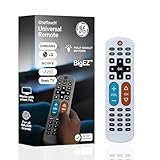
Tek Pal Universal Remote for Seniors
The Tek Pal Universal Remote features oversized backlit buttons with high-contrast labeling that glows clearly in a dimly lit room. With compatibility for thousands of TV, cable box, and streaming device models, it can control an entire entertainment system from a single remote. The large grip surface with rubberized sides prevents slipping, and the setup process requires only pressing two buttons to program. Available in both English and bilingual versions.
GE Big Button Universal Remote Control (4-Device)
The GE Big Button Universal Remote controls up to four devices (TV, DVD, Blu-ray, streaming box) from a single, easy-to-hold remote. The code library covers thousands of device brands, and the direct code entry or code search setup takes under five minutes. Large buttons with raised tactile indicators help visually impaired seniors identify functions by touch, and the built-in backlighting illuminates all buttons for nighttime viewing. A solid, affordable choice for seniors with multi-device home theater setups.
Features That Make a Remote Easy for Seniors
A large-button remote removes much of the frustration that comes with the crowded, tiny buttons on a standard remote, which can be hard to see and press for those with vision changes or arthritis. The most helpful designs keep things simple, with a small number of big, well-spaced buttons clearly labeled for the functions that actually get used: power, volume, channel, and input. High-contrast lettering, such as white text on black keys, makes the buttons easy to read at a glance, and some models add backlighting for use in a dim room. A comfortable shape that is easy to hold and does not slip from the hand adds to the appeal. For caregivers, a remote that can be programmed once and then locked to essential functions prevents accidental changes to settings.
Setting Up and Using a Large-Button Remote
Most senior-friendly remotes are designed to be simple to set up, often using a code for the specific television brand or an automatic search to learn the right signals; following the included instructions step by step usually takes only a few minutes. Once programmed, label or note which button does what if the user is still learning, and place the remote in a consistent, easy-to-find spot so it is not constantly misplaced. Keep fresh batteries on hand, since weak batteries cause unreliable response that can be confusing. If the household has several devices, a universal large-button model that controls the television and cable box together avoids the need to juggle multiple remotes. Choosing one well-matched remote and removing the others from view often makes daily television use far less stressful for an older adult.
Helping a Senior Get Comfortable With the Remote
Even the simplest remote works best when the user feels confident with it, so a little setup support goes a long way. After programming, walk through each button together, showing what power, volume, channel, and input do, and consider adding a small, clear label if a function is easy to confuse. Removing other remotes from view prevents the common frustration of picking up the wrong one, and choosing a universal large-button model that runs both the television and cable box keeps everything on a single device. Keep fresh batteries on hand, since weak batteries cause the inconsistent response that often gets mistaken for a broken remote. Store it in a consistent, easy-to-reach spot so it is not constantly misplaced. With the clutter cleared and the controls limited to what matters, daily television becomes a source of enjoyment rather than a recurring source of confusion for an older adult.
Related Guides
- Making Your Home Wheelchair Accessible: Room-by-Room Guide
- Best Large Digital Clock for Seniors
- Transportation Options for Seniors Who No Longer Drive
Frequently Asked Questions
What makes a remote easier for seniors to use?
Large, well-spaced buttons with high-contrast labels for the functions that get used most, such as power, volume, channel, and input. Some models add backlighting for use in a dim room.
Are large-button remotes hard to set up?
Most are simple to set up, using a code for the television brand or an automatic search to learn the right signals. Following the included instructions step by step usually takes only a few minutes.
Can a large-button remote control more than the TV?
Yes. A universal large-button model can control the television and cable box together, which avoids juggling multiple remotes and reduces confusion.
Can I lock the remote to essential functions?
Some remotes can be programmed once and then locked to a few essential buttons, which prevents accidental changes to settings and keeps daily use simple.
How do I keep the remote from getting lost?
Place it in a consistent, easy-to-find spot, keep fresh batteries on hand for reliable response, and consider removing extra remotes from view so only the simple one is in use.
Final Thoughts
Replacing a complex standard remote with a simple large-button model is an easy, low-cost way to improve daily comfort and independence for seniors. If your loved one is also struggling with television audio clarity, consider pairing the new remote with a TV sound amplifier or personal TV speaker designed for seniors with hearing loss.
Related Reviews & Guides




11 Best Video Call Devices for the Elderly: Stay Connected With Family Easily

10 Best Wheelchairs: Top Picks Reviewed and Compared (2026)