Last Updated: November 26, 2026
As an Amazon Associate we earn from qualifying purchases.
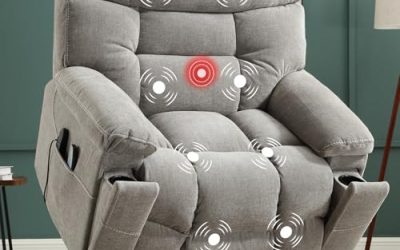
A power cut at the wrong moment can leave a lift chair user reclined flat with no way to get up, and that single scenario drives the whole decision around a battery backup. The right unit is not the biggest or the most expensive one; it is the one that fits the chair’s motor, connects without an adapter, and still holds a charge after months of sitting unused. Choosing well means matching the backup to the chair first and thinking about capacity second.
This guide is written for seniors who use a lift chair every day, for adult children setting up a parent’s living room, and for caregivers who need the chair to work during an outage without fumbling for instructions in the dark. It walks through connector types, battery chemistries, charging habits, and the checks that tell you the backup will actually work when the lights go out.
What a Lift Chair Battery Backup Actually Does
A lift chair runs on mains power through a transformer that steps household current down to the low voltage the motor needs. A battery backup sits between the wall outlet and that transformer, or plugs into a dedicated port on the motor housing, and takes over the moment mains power disappears. Its job is narrow and specific: give the motor enough power to return the chair from a reclined position to an upright seated position, and then to lift the occupant toward standing.
Most backups are not designed to run the chair all evening. Heat, massage, and USB charging usually switch off during battery operation, because the motor needs every bit of stored energy for the lift itself. Some chairs arrive with a battery compartment already built in, often holding small rectangular batteries that the owner replaces from time to time. Others need an add-on pack sold by the chair maker or a compatible third-party unit. Either way, the backup only helps if it is charged, connected, and matched to the chair before an outage happens. A pack sitting in a drawer, or one bought for a different brand, does nothing when the lights go out.
The Main Backup Options Compared
Four broad options cover most homes, and each suits a different household. The table below gives a quick sense of how they differ before the detailed guidance that follows.
| Backup type | What it powers | Best suited to |
|---|---|---|
| Manufacturer rechargeable pack | Lift and recline motor | Daily users who want a tidy, purpose-built fit |
| 9V emergency battery box | One emergency return to upright | Chairs with a built-in 9V compartment |
| Uninterruptible power supply (UPS) | Motor plus a short window of normal use | Homes with frequent brief outages |
| Replacement transformer with battery | Motor through the standard power path | Chairs whose original transformer has failed |
A manufacturer pack usually fits best because it was designed around the chair’s motor and connector, and it often charges itself whenever the chair is plugged in. A 9V emergency box is the cheapest and simplest safety net, and it makes sense as a second layer of protection rather than the only plan. A UPS brings more capacity and can keep the chair usable through a longer interruption, yet it takes up floor space, needs its own battery replacements, and must be rated for the motor’s draw. A replacement transformer with a built-in battery solves two problems at once when the original power supply is failing, though it still has to match the chair’s voltage and plug exactly.
How to Choose
Match the Connector and Plug First
Lift chair motors use several different plug shapes, including round pin connectors, flat two-pin plugs, and rectangular multi-pin fittings. A backup with the wrong connector cannot be forced into place, and a lookalike adapter may still deliver the wrong voltage or reverse the polarity. Before ordering, look at the plug where the chair’s power cord meets the motor or hand control, note the pin count and arrangement, and compare it with the backup’s plug in the listing photos. The chair’s manual usually names the compatible battery part number, and the maker’s support line can confirm it from the model label under the seat. Getting this right avoids a backup that cannot help during an outage.
Pick the Battery Type for How Often Outages Happen
Rechargeable lithium packs hold a charge well between uses and suit homes where outages are rare but possible, while older nickel-based packs cost less yet need more frequent attention to stay ready. Small 9V emergency boxes are the simplest option of all and work well as a last-resort measure, though they are generally meant for a single emergency movement rather than repeated use. Households in storm-prone areas may prefer a larger rechargeable pack or a UPS that can handle more than one cycle. Whatever chemistry you choose, check how the pack behaves after months on standby, whether it recharges from the wall automatically, and how you will know when its cells are ageing and need replacing.
Check Runtime Against One Full Movement
Manufacturers describe runtime in different ways, so the figure that matters is whether the backup can complete a full return from a fully reclined position to an upright seat and then lift the occupant to standing, with the chair loaded. A pack that only manages a partial movement leaves the user stuck halfway, which is little better than no backup at all. Ask the seller or check the manual for the number of complete cycles the pack supports on a full charge, and treat vague claims such as long-lasting with caution. A heavy-duty chair, or a user near its weight limit, draws more current, so the same pack delivers fewer cycles and a larger reserve is worth considering.
Look at Charging, Testing and Replacement
A backup that is never charged is decoration, so the charging routine matters as much as the battery itself. Some packs charge automatically whenever the chair is plugged into the wall, while others need to be removed and charged separately, which only works if someone remembers to do it. Choose a pack with a visible charge indicator or a test button, and put a monthly test on the calendar: unplug the chair from the wall, run the lift, and confirm it returns smoothly. Note the date the pack was installed and the replacement interval in the manual, because rechargeable cells lose capacity with age even when they are rarely used.
Which One Fits Your Situation
You Live Alone and Use the Chair Daily
A manufacturer rechargeable pack that charges itself whenever the chair is plugged in fits this situation best. It needs no remembering and no extra steps, so the chair is ready even if an outage strikes at night. Pair it with a monthly test on the same day you check the smoke alarm, and keep the hand control clipped where you can reach it from a reclined position.
You Are Setting Up a Chair for an Elderly Parent
Simplicity matters more than capacity here, so a manufacturer pack plus a 9V emergency box gives two layers of protection without any complicated routine. Label the battery compartment with a short written note explaining what to press if the power fails, and walk through the test together once so your parent has done it before it ever matters.
Your Area Loses Power Often or for Hours
A larger rechargeable pack or a UPS is the sensible choice when outages are frequent or long. A single emergency cycle will not be enough if the power drops twice in one evening, and a bigger reserve covers a second movement. Keep a spare charged pack if the chair supports swapping, and store a torch beside the chair so nobody is feeling for controls in the dark.
Your Chair Already Has a Built-In Battery Compartment
Use the battery size and type printed in the chair’s manual, and replace the cells on the schedule it gives rather than waiting for them to fail. After fitting fresh batteries, run a full test with the wall power unplugged to confirm the chair returns to upright. A built-in compartment is only useful when the batteries inside it are fresh and the contacts are clean.
Staying Safe When the Power Goes Out
A battery backup is a safety device, so treat it with the same respect as any other piece of medical or mobility equipment. Never plug a backup into a chair it was not made for, and never force a connector that does not fit, because the wrong voltage can damage the motor or the hand control. Follow the chair manufacturer’s guidance on which battery packs are approved, and do not open a sealed battery pack or try to repair it yourself.
Keep the backup charged and test it regularly, as described above, so there are no surprises during a real outage. Store spare batteries somewhere dry and at room temperature, and keep them away from metal objects that could short the terminals. Make sure cords run where nobody will trip over them, and keep the area around the chair clear so the lift mechanism can move freely.
If the chair stops halfway through a lift on battery power, stay calm, stop pressing the control, and call for help rather than rocking or forcing the mechanism. Keep a charged phone within reach of the chair, and consider a personal alarm or a regular check-in routine for anyone who lives alone. Finally, remember that a backup covers the lift motor only; if the outage lasts a long time, plan for lighting, heating, and a way to contact family or a neighbour.
Common Mistakes
- Buying a backup before checking the connector, then discovering it cannot plug into the chair at all.
- Assuming heat, massage, and USB charging will keep working on battery power when most backups feed the lift motor only.
- Never testing the pack until a real outage, when a dead or disconnected battery is found too late.
- Leaving a rechargeable pack unplugged for months so its cells drain and lose capacity.
- Fitting a backup rated for a different chair brand or voltage and risking damage to the motor or control box.
Frequently Asked Questions
Will a battery backup let me keep using my lift chair normally during a power cut?
No, and it is important to understand the limit before you buy. A battery backup is designed to return the chair from reclined to upright and lift the occupant toward standing, not to run the chair for hours. Heat, massage, and USB charging usually stop during battery operation so the motor gets all the stored energy. Use the backup to get up safely, then wait for mains power to return.
How do I know which battery backup fits my lift chair?
Start with the chair’s manual, which usually names the compatible battery part number, and check the model label under the seat. Compare the connector shape, pin count, and voltage with the backup’s listing, and confirm with the manufacturer’s support line if anything is unclear. A backup that matches on all three points is the right one; matching on only one or two is not enough.
How often should I test or replace the backup battery?
Test the backup once a month by unplugging the chair from the wall and running a lift cycle, and replace the batteries on the interval given in the manual. Rechargeable packs lose capacity with age even when they are rarely used, and small emergency batteries should be swapped on schedule rather than after they fail. Write the installation date on the pack so the next replacement is easy to remember.
Can I use a regular UPS instead of a lift chair battery pack?
A UPS can work if it is rated for the motor’s power draw and has the right output for the chair’s transformer, and it suits homes with frequent short outages. Check the chair’s power requirements in the manual, and confirm the UPS can handle the motor’s starting surge without shutting down. A purpose-built manufacturer pack is simpler, since it connects directly and charges itself whenever the chair is plugged in.
Related Reviews & Guides





6 Best Do Compression Socks Works For Swelling 2026
Best Safety Products for a Senior-friendly Living Room