Last Updated: September 26, 2026
An electronic handheld magnifier, sometimes called a portable video magnifier, uses a small camera and screen to enlarge whatever it is pointed at. For people with moderate low vision, it can do things no glass lens can: change contrast, freeze an image, and magnify many times without shrinking the viewing area. That makes it a powerful everyday tool for reading mail, labels, receipts and menus. This guide explains what to look for so you can choose one that suits your eyes and hands.
How Electronic Magnifiers Differ From Glass
A glass magnifier gets smaller and harder to use as power increases. An electronic magnifier keeps the same screen size at every level, typically ranging from about 2x to 20x or more. It can also invert colors, for example yellow text on a blue background, which many people with macular degeneration find easier to read. Glare is lower, and you do not need to hold the device at a precise focal distance.

Eyoyo 3.5" Portable Digital Video Magnifier, 2X-25X Zoom Reading Aid White
Included for 'Best Electronic Handheld Magnifier' because the listing specifies 2X-25X Zoom Reading Aid White, details this guide uses to compare options.
View on Amazon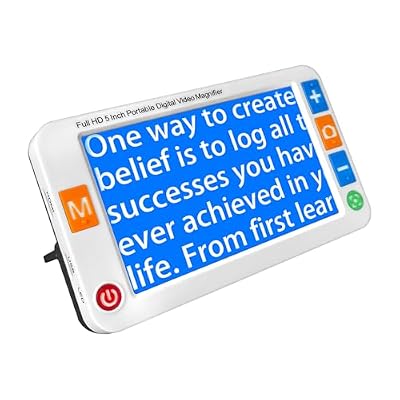
MoreDisp Digital Magnifier 5 Inch,Electronic Auto Focus Reading Aid Simplified Buttons Digital Video Magnifier for The Visually Impaired, Low Vision, Color Blindness, Amblyopia,26 Color Modes
Included for 'Best Electronic Handheld Magnifier' because the listing specifies Low Vision and Color Blindness, details this guide uses to compare options.
View on Amazon
Eyoyo 3.5" Portable Digital Video Magnifier, 2X-25X Zoom Reading Aid Black
Included for 'Best Electronic Handheld Magnifier' because the listing specifies 2X-25X Zoom Reading Aid Black, details this guide uses to compare options.
View on AmazonKey Features to Compare
Screen size
Handheld units usually range from about 3.5 to 7 inches. A 4.3-inch screen fits in a pocket; a 5 to 7-inch screen shows more words at once and is easier for longer reading. Larger screens add weight.
Magnification range
Check the minimum as well as the maximum. A low minimum, around 2x, is helpful for seeing layout and finding your place. Most daily reading happens between about 4x and 10x.
Contrast and color modes
Look for several high-contrast modes, such as white on black, yellow on blue, and black on yellow. Being able to choose your favorite and set it as default saves time.
Freeze frame and capture
Freeze lets you snap an image, such as a price tag on a high shelf, and then bring the device closer to read it. Some models store several images.
Buttons and controls
Large, tactile buttons that are easy to tell apart by touch are important. Touchscreens can be confusing for some users.
Battery life
Expect roughly 2 to 5 hours of continuous use. Check how easy the charging connection is to plug in.
Stand or reading position
A fold-out handle or stand lets you rest the device on the page and glide it along the lines, which is steadier than holding it in the air.
Speech output
Some advanced handhelds can read printed text aloud. This is useful for longer documents or for people whose vision fluctuates.
| Screen size | Portability | Reading comfort | Typical price range |
|---|---|---|---|
| 3.5–4.3 in | Pocket-sized | Short tasks | $100–$300 |
| 5 in | Bag-sized | Mail, menus | $250–$600 |
| 7 in | Bag, heavier | Letters, longer reading | $400–$1,000 |
| 7 in with speech | Bag, heavier | Reading documents aloud | $800–$1,800 |
Choosing by Need
Quick checks while out: a small 4-inch model that fits a pocket. Daily mail and bills at home: a 5 to 7-inch model with a reading stand. Macular degeneration: prioritize contrast modes and a bright screen. Tremor or arthritis: choose a model with a built-in stand and large, well-spaced buttons. Fluctuating vision or fatigue: consider speech output.
Practical Tips
- Try several models at a low vision clinic or sight-loss charity before buying, as screen quality and button layout vary.
- Learn one mode well before exploring every feature.
- Use a line guide or typoscope, a card with a slot, to keep your place on the page.
- Keep it charged in a regular spot so it is always ready.
- Ask about loan schemes, grants or veterans’ programs, as some services help with costs.
Electronic Handheld vs Smartphone Apps
Smartphone magnifier apps are free and handy. However, dedicated devices usually have simpler controls, better lighting for reading, steadier images and physical buttons. For someone who is not confident with smartphones, a dedicated handheld is often easier.
FAQ
Is an electronic magnifier better than a glass magnifier?
For moderate low vision and longer reading, often yes, because of higher magnification and contrast options. Glass magnifiers remain lighter, cheaper and need no charging.
Can an electronic magnifier help with macular degeneration?
Many people with macular degeneration find contrast modes and adjustable magnification helpful, but it does not treat the condition. A low vision assessment helps find the best setup.
Bottom line
The best electronic handheld magnifier for most seniors has a 5-inch screen, a wide magnification range, several high-contrast modes, freeze frame and large tactile buttons. Try before you buy, match screen size to your main task, and use it alongside good lighting. It can turn frustrating small print into readable text again.
Related Reviews & Guides


Best Lowa Hiking Boots for Comfort, Support, and Trail Grip
Best In-ear Hearing Aids for Active Seniors