Last Updated: October 7, 2026
GrandPad built its reputation as a tablet designed for older adults: a closed, simplified system, built-in cellular data, a private family network that blocks strangers, and a support line to call when something goes wrong. Families usually pay for it through an ongoing subscription rather than a one-time purchase. For many households that bundle is worth it. For others, the monthly cost adds up, the limited app selection feels restrictive, or the older adult wants to do more than the closed system allows. The good news is that each part of the GrandPad package can be replicated in other ways. This guide breaks the package into its pieces and shows the alternatives for each.
What you are actually paying for
Understanding the bundle helps decide what to replace. A subscription senior tablet typically provides five things: the device itself; mobile data so no Wi-Fi setup is needed; a simplified interface with large buttons; a private contact list so only approved family members can call; and human support. Families who value all five equally may be happiest staying with a service. Families who mainly want one or two of these can often save money and gain flexibility elsewhere.

Amazon Fire HD 10 tablet, built for relaxation, 10.1" vibrant Full HD screen, octa-core processor, 4 GB RAM, 32 GB, Black
Included for 'Best GrandPad Alternative for Seniors 2026' because the listing specifies built for relaxation and 10.1" vibrant Full HD screen, details this guide uses to compare options.
View on Amazon
Amazon Fire HD 8 tablet (newest model), 8” HD Display, 4GB memory, 64GB, responsive and vibrant, designed for portable entertainment, Black
Included for 'Best GrandPad Alternative for Seniors 2026' because the listing specifies 8” HD Display and 4GB memory, details this guide uses to compare options.
View on Amazon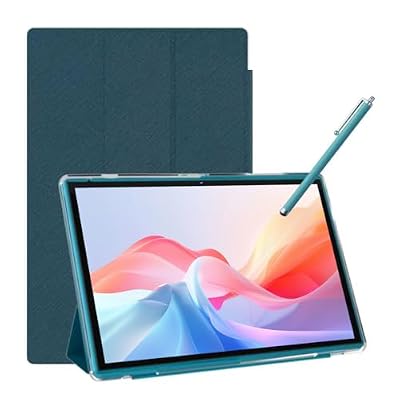
Android Tablet 10 Inch Tablet With Case Stylus Android 15 Tablets 8GB RAM 32GB ROM Support 1TB Expansion 6000mah Battery 10.1" IPS HD Touchscreen 2MP+8MP Dual Camera WIFI-6 Bluetooth5.0 Tablets
Included for 'Best GrandPad Alternative for Seniors 2026' as a relevant option in this category; details come from the product listing.
View on AmazonAlternatives by what matters most
| Priority | Alternative | Trade-off |
|---|---|---|
| Simplicity | Mainstream tablet with a simplified senior launcher app | Needs initial setup by a family member |
| Private, scam-free calling | Tablet or smart display restricted to approved contacts, plus call-blocking | Must be configured carefully |
| No Wi-Fi at home | Cellular tablet on a low-cost data plan, or a mobile hotspot | Separate plan to manage |
| Hands-free video calls | Smart display with auto-answer for approved contacts | Fixed location, no portability |
| Photo sharing | Cloud-connected digital photo frame | Receive-only on most models |
| Human support | Carrier or retailer tech support plan, library tech help, remote management by family | Less personal than a dedicated line |
The main alternative routes
Mainstream tablet plus launcher
A standard 10-inch tablet running a simplified launcher can show just a handful of large tiles: family video calls, photos, a weather display, and a magnifier. Launchers typically let a family member hide the settings menu and app store so the senior cannot accidentally change things. The device is bought once, and apps and data plans are chosen freely. The catch is that someone in the family has to be the IT department.
Smart display on the kitchen counter
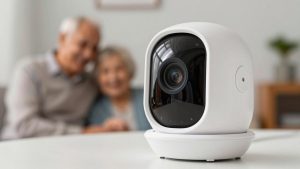
For older adults who mainly want to see family, a smart display with a camera may be simpler than any tablet. It stays plugged in, never needs charging, and can be set to let approved contacts drop in or auto-answer. It also works as a clock, reminder board, and photo frame. It needs home Wi-Fi.
Digital photo frame with family uploads
For someone with advanced memory loss or no interest in technology, a cloud photo frame that family members email or upload pictures to provides connection without any interaction. Pairing it with an easy phone covers calls.
Remote-managed smartphone or tablet
Mobile device management features and remote support apps let a family member see and fix the device from afar, with the senior’s permission. This replaces much of what a support line offers.
Cost thinking over three years
A fair comparison adds up the full cost over a realistic period, such as three years. For a subscription tablet, that is the monthly fee times 36 plus any setup charges. For alternatives, it is the device price, any data plan, and paid apps or support. Families often find mainstream options cost noticeably less over time, but only if someone is willing to handle setup and troubleshooting. If nobody is, the subscription’s support may be worth the premium.
Safety features to keep
- Allow calls only from known contacts, and silence unknown callers.
- Disable app installs or require family approval.
- Turn on automatic security updates.
- Set up a strong lock that the senior can still manage, such as face unlock.
- Talk about scams that impersonate family members, banks, or government agencies.
Frequently asked questions
Is a GrandPad better than an alternative for someone with dementia?
A closed, simple system can be easier in the early stages of dementia. A well-configured smart display with auto-answer from family can be even simpler as the condition progresses, since it requires no action from the user.
Can a senior tablet work without home internet?
Yes, if it has cellular data. Many mainstream tablets come in cellular versions, and prepaid data plans are available. Alternatively, a small mobile hotspot can provide Wi-Fi for a tablet or smart display.
Bottom line
The best GrandPad alternative depends on which part of the package matters most. A mainstream tablet with a senior launcher gives flexibility and lower long-term cost; a smart display offers the easiest video calls; a cloud photo frame suits those who want connection without effort. If no one in the family can handle setup and support, a subscription service may still be the right answer.
Related Reviews & Guides
Best CPU Water Coolers for Quiet, High-Performance PCs
Lightweight Donut Cushion for Seniors With Tailbone Pain