Last Updated: September 26, 2026
Keys are a small but constant source of trouble in later life. Arthritic fingers struggle to turn them, low vision makes the keyhole hard to find in the dark, keys get lost, and spare keys hidden under a mat invite trouble. Meanwhile, families, home health aides, and emergency responders may all need to get in. A keyless smart lock can solve several of these problems at once, letting a senior enter with a keypad code or fingerprint, and letting trusted people in without handing out copies of a key. This guide explains which lock features matter for older adults and how to avoid creating a new problem while solving an old one.
Why keyless entry helps older adults
- No fine motor task: pressing large keypad buttons or touching a fingerprint reader is easier than gripping and turning a small key.
- No lost keys: codes cannot be dropped or misplaced.
- Controlled access: caregivers and family get their own codes, which can be scheduled or deleted.
- Emergency entry: a code can be shared with emergency services or kept in a lockbox registry, avoiding a broken door.
- Auto-lock: the door locks itself after closing, useful for forgetful residents.
Entry methods compared
| Entry method | Ease for seniors | Drawbacks |
|---|---|---|
| Physical keypad with raised buttons | High; tactile and backlit | Code must be remembered |
| Touchscreen keypad | Moderate | Harder with low vision or wet fingers |
| Fingerprint reader | High for many | Older, thin, or dry fingerprints may read poorly |
| Phone app or auto-unlock | Low to moderate | Depends on phone and battery |
| Key fob or card | High | Can be lost, like keys |
| Backup physical key | Emergency option | Keep somewhere safe |
Features that matter most
Large, tactile, lit keypad
Physical buttons with raised numbers and a backlight are usually the easiest for seniors, including those with low vision or neuropathy. A small raised dot on the 5 helps orientation.
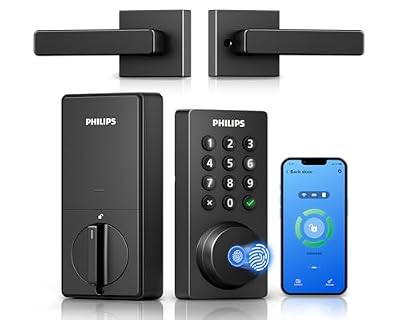
Philips WiFi Keypad Deadbolt with Handle, Built-in WiFi, APP Remote Control
Included for 'Best Keyless Smart Lock for Seniors 2026' because the listing specifies Built-in WiFi and APP Remote Control, details this guide uses to compare options.
View on Amazon
Veise VE017 Fingerprint Smart Door Lock with App Control, Matte Black
Included for 'Best Keyless Smart Lock for Seniors 2026' because the listing specifies Matte Black, details this guide uses to compare options.
View on Amazon
Philips Wi-Fi Smart Deadbolt Lock, Keyless Entry Door Locks for Front Door
Included for 'Best Keyless Smart Lock for Seniors 2026' because the listing specifies Keyless Entry Door Locks for Front Door, details this guide uses to compare options.
View on Amazon
Philips Upgraded Wi-Fi Smart Lock with Handle, Keyless Entry Door Lock, Smart Door Knob, Fingerprint Unlock, App Remote Control, Auto-Lock, Keypad Deadbolt with Lever for Bedrooms, Office, Front Door
Included for 'Best Keyless Smart Lock for Seniors 2026' because the listing specifies Keyless Entry Door Lock and Smart Door Knob, details this guide uses to compare options.
View on AmazonLever handle versus knob
Many smart locks are deadbolts that work with the existing knob. If the door has a round knob, replacing it with a lever handle makes opening much easier for arthritic hands. Some smart locks come as a lever set.
Auto-lock with a delay
Auto-lock is valuable but should have an adjustable delay so the resident is not locked out while bringing in groceries.
Access logs and scheduled codes
A log shows when each code was used, helpful for confirming caregiver visits. Scheduled codes can limit a cleaner or aide to specific hours.
Battery life and warnings
Most smart locks run on AA batteries for months. Choose one with early low-battery warnings to both the keypad and family phones, and a backup method such as a physical key or external battery contacts.
Special situations
Dementia and wandering
Keyless locks make entering easier, but they can also make leaving easier. For someone at risk of wandering, discuss door alarms and lock placement with the care team; fire safety rules require that occupants can exit without a key or code from inside, so any restriction must be carefully considered.
Renters and condos
Some smart locks retrofit over the existing deadbolt interior, keeping the outside unchanged. Check lease and building rules first.
Installation
Most smart deadbolts install with a screwdriver in under an hour on a standard door. Misaligned doors that require pushing or pulling to lock can cause motor jams and battery drain, so fix alignment first. A handyman can help.
Security considerations
Choose locks certified to recognized residential lock standards, keep firmware updated, avoid simple codes like 1234 or birthdays, and change codes when caregivers change.
Helping the senior remember the code
A code that is forgotten is as bad as a lost key. Choose a number with personal meaning that is not publicly known, such as an old house number combined with a favorite year, and practice it together several times. Avoid writing it on the door frame; a note in the wallet disguised as a phone number is safer. Keep the backup key with a trusted neighbor rather than under a planter.
Frequently asked questions
What happens if the power or Wi-Fi goes out?
Battery-powered keypads continue to work without power or Wi-Fi. Remote features stop until the connection returns.
Can emergency responders get in?
Share a code with a trusted neighbor or register with a local lockbox or key program if available. Medical alert services often store entry information for responders.
Bottom line
For most seniors, a smart deadbolt with a backlit, raised-button keypad, adjustable auto-lock, access logs, early battery warnings, and a backup key is the best keyless choice. Pair it with a lever handle, fix door alignment first, and think carefully about safety if memory loss or wandering is a concern.
Related Reviews & Guides

Best Rollator for Cruise Travel
Best Jar Openers for Seniors with Parkinson’s Tremors