Last Updated: October 9, 2026
- Top Pick: Medical Alert System – NO Monthly FEES – Waterproof Necklace and Wrist
- Best Value: No Subscription, No Contract, No Monthly Fees, Senior Elderly Medical Alert
- Premium Choice: Life Alert Systems for Seniors No Monthly Fee App-Controlled, Medical Alert Systems for Seniors with 2 Call Button 1 Receiver and1-6 LED Number Display (Only Supports 2.4GHz Wi-Fi)
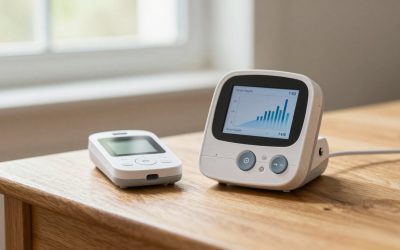
For families weighing a medical alert setup for the bedroom, bathroom, or living room, the real sticking point is not the hardware — it is the ongoing cost. Traditional monitored systems bundle a base station, a wearable button, and a 24/7 call center, but that service typically tacks on $25 to $50 every month. If you are caring for a parent who lives alone or you want backup coverage without a subscription, a no-monthly-fee system that alerts family or calls 911 directly can be a practical alternative.
In 2026, the best no-fee options have shifted toward simple, caregiver-focused designs: a waterproof pendant or wristband paired with a plug-in receiver, a landline dialer, or an app-controlled Wi-Fi hub that pings your phone. They do not replace professional monitoring for high-risk users, but they eliminate contracts and keep the total cost to a one-time purchase. Below are eight solid picks we evaluated for in-home use, with clear trade-offs for range, setup, and who actually gets alerted.
As an Amazon Associate we earn from qualifying purchases at no extra cost to you.


Quick Picks
| Product | Best for | Price |
|---|---|---|
| Medical Alert System – NO Monthly FEES – Waterproof Necklace and Wrist | Best Overall No-Fee System | under $150 |
| Life Alert Systems for Seniors No Monthly Fee App-Controlled, Medical Alert Systems for Seniors with 2Call Button1Waterproof Wristband 1Receiver and1-6 LED Number Display (Only Supports 2.4GHz Wi-Fi) | Best Budget App-Controlled Kit | under $50 |
| No Subscription, No Contract, No Monthly Fees, Senior Elderly Medical Alert | Best for Simple Setup Without Contracts | under $150 |
| Life Alert Systems for Seniors No Monthly Fee App-Controlled, Medical Alert Systems for Seniors with 2 Call Button 1 Receiver and1-6 LED Number Display (Only Supports 2.4GHz Wi-Fi) | Best Value Two-Button Kit | under $40 |
| Senior HELP Dialer Medical Alert – No Monthly Fees Medical Alert System- HD700 | Best Landline Dialer System | under $150 |
| SmartGo 911 Help Now No Monthly Fees One-Touch Direct Connect Emergency Communicator Medical Alert Button Pendant – White | Best for Direct 911 Connection | under $150 |
| No Monthly Fees – Life Guardian – Medical Alarm – Emergency Alert – SOS – | Best for One-Touch SOS Simplicity | under $150 |
| Life Alert System No Monthly Fee, Caregiver Pager Call Button for Elderly at Home, Medical Alert Systems for Seniors with App, Panic Button Alarm System, 2.4GHz WiFi Receiver, Necklace, Bracelet | Best Caregiver Pager on a Budget | under $40 |
How We Picked
We focused exclusively on systems sold as no monthly fees, no subscription, and no contract, prioritizing in-home use where most falls happen — the bedroom, bathroom, and hallway. We weighed how each system alerts help, whether through a loud in-home receiver, a landline dialer that calls preset numbers, or a Wi-Fi-connected app that notifies caregivers on their phones. Ease of setup mattered, especially for seniors who need a large, easy-to-press button and a wearable that can handle water exposure in the shower.
We also screened for practical ownership details: one-time price, what is included in the box (number of buttons, wristband vs. necklace, receiver type), and limitations such as Wi-Fi band support. Many app-controlled kits in this roundup only support 2.4GHz Wi-Fi, which is common but worth noting if your home runs a 5GHz-only network. We did not conduct lab testing or measure transmit range, battery life, or decibel levels, so we are not publishing test scores. Instead, we evaluated design, intended use case, and value based on manufacturer specifications and typical in-home scenarios.
The 8 Best Picks
1. Medical Alert System – NO Monthly FEES – Waterproof Necklace and Wrist
This system is for households that want a straightforward, wearable-first kit without an app or phone pairing. It comes with both a necklace and a wrist option and is listed as waterproof, so it can be worn in the bathroom where assistance is often needed most. The approach is intentionally low-tech: press the button and the in-home receiver alerts, making it easy for a senior to use without learning new software. For under $150, it sits at the higher end of this list but avoids any recurring charges, which keeps long-term costs predictable for families managing care at home.
- Pro: Includes two wearable options for flexibility between necklace and wrist
- Pro: Waterproof design supports daily wear, including in the shower
- Con: No app or off-site smartphone alerts, so coverage is limited to the in-home receiver range
When to skip: If you need remote notifications when you are away from home, choose an app-controlled kit instead.
2. Life Alert Systems for Seniors No Monthly Fee App-Controlled, Medical Alert Systems for Seniors with 2Call Button1Waterproof Wristband 1Receiver and1-6 LED Number Display (Only Supports 2.4GHz Wi-Fi)
Built for caregivers who want phone alerts on a budget, this app-controlled kit pairs two call buttons and one waterproof wristband with a receiver that shows a 1-6 LED number display. The display helps identify which button was pressed when multiple buttons are placed in different rooms, such as the bedroom and bathroom. Control runs through an app over 2.4GHz Wi-Fi, so setup requires a compatible router and a smartphone. For under $50, it is one of the most affordable ways to get multi-room coverage and remote notifications without a monitoring contract.
- Pro: App notifications let family respond quickly even when not in the house
- Pro: LED number display helps pinpoint which room triggered the alert
- Con: Only supports 2.4GHz Wi-Fi, so it will not connect to 5GHz-only networks
When to skip: If your home has no reliable Wi-Fi or you prefer a landline-based dialer, consider a non-Wi-Fi option.
3. No Subscription, No Contract, No Monthly Fees, Senior Elderly Medical Alert
This pick is aimed at buyers who want to avoid fine print altogether. Marketed with no subscription, no contract, and no monthly fees, it is designed as a one-time purchase to keep costs simple for fixed-income households. The system is best used as a basic in-home alert where a caregiver is nearby or checks in frequently. For under $150, it costs more upfront than the budget Wi-Fi kits, but that price covers the hardware without ongoing billing. It is a good fit if you value straightforward ownership over app extras.
- Pro: No subscription or contract keeps total cost of ownership clear
- Pro: Simple alert workflow that is easy for seniors to remember under stress
- Con: Lacks advanced caregiver features found on app-controlled systems, such as phone push notifications
When to skip: If you need alerts sent to your phone while you are away, an app-enabled system will serve you better.
4. Life Alert Systems for Seniors No Monthly Fee App-Controlled, Medical Alert Systems for Seniors with 2 Call Button 1 Receiver and1-6 LED Number Display (Only Supports 2.4GHz Wi-Fi)
Similar in concept to the other app-controlled kits, this version includes two call buttons and one receiver with a 1-6 LED number display, all managed through an app over 2.4GHz Wi-Fi. It is ideal for a small apartment or single-level home where two buttons cover the key risk areas and one receiver provides a central audible alert. For under $40, it is the lowest-priced dual-button kit in this roundup, making it attractive for families testing a no-fee setup before committing to a more expensive dialer or pendant system. Just confirm your router broadcasts 2.4GHz during setup.
- Pro: Very low one-time price for a two-button, app-connected setup
- Pro: Numbered display makes it easy to map buttons to rooms
- Con: Only supports 2.4GHz Wi-Fi, which limits placement flexibility in some modern networks
When to skip: If you need direct 911 calling without a smartphone, look at the pendant communicator below.
5. Senior HELP Dialer Medical Alert – No Monthly Fees Medical Alert System- HD700
The HD700 is designed for homes that still use a landline and want the system to call for help automatically. Rather than relying on Wi-Fi or an app, a dialer base unit calls preset phone numbers when the help button is pressed, which is useful when the caregiver is not in earshot of a receiver. This traditional approach can be more reassuring for seniors who are comfortable with a phone line and prefer a loud, familiar call sequence over push notifications. For under $150, it matches the price of other dialer-style systems and keeps the ongoing cost at zero beyond standard phone service.
- Pro: Landline dialer can reach family directly without Wi-Fi or a smartphone
- Pro: Familiar form factor for seniors who already have a landline in the bedroom
- Con: Requires a working landline; not ideal for cord-cutting households that are wireless only
When to skip: If you do not have a landline or want app alerts on the go, choose a Wi-Fi kit instead.
6. SmartGo 911 Help Now No Monthly Fees One-Touch Direct Connect Emergency Communicator Medical Alert Button Pendant – White
This pendant is built around a single, critical function: one-touch direct connection to emergency help. It is intended for seniors who live alone and want a simple press to reach 911 without navigating an app or relying on a family member to answer first. The white pendant form is discreet for daily wear around the house and can be kept at the bedside at night. For under $150, it is the highest-priced item here by a small margin, but it is also the most direct path to emergency dispatch among the no-fee options that otherwise alert only caregivers or an in-home receiver.
- Pro: One-touch design reduces steps during an emergency and goes directly to help
- Pro: Pendant format keeps help within reach without a base station in every room
- Con: Direct-to-911 focus means fewer caregiver notification options compared with app-based pagers
When to skip: If you primarily need caregiver alerts rather than a direct 911 link, a pager-style kit may be more practical.
7. No Monthly Fees – Life Guardian – Medical Alarm – Emergency Alert – SOS –
Life Guardian is positioned as a simple SOS solution for seniors who need a clear emergency signal at home. It uses a classic alert workflow where pressing the SOS button triggers the in-home alarm, prompting nearby family to assist. The lack of subscription keeps the buying decision simple, and the hardware-first approach avoids app setup and Wi-Fi troubleshooting. For under $150, it is priced in line with other standalone SOS alarms and works best when someone is usually nearby or neighbors and family can respond quickly.
- Pro: Straightforward SOS operation that is easy to teach and remember
- Pro: No monthly fees or contracts, so there are no surprises after purchase
- Con: No smartphone app for off-site alerts, which limits coverage when caregivers are away
When to skip: If you need remote monitoring while at work or traveling, pick an app-controlled pager system.
8. Life Alert System No Monthly Fee, Caregiver Pager Call Button for Elderly at Home, Medical Alert Systems for Seniors with App, Panic Button Alarm System, 2.4GHz WiFi Receiver, Necklace, Bracelet
This caregiver pager kit is the most affordable app-connected option in the group for under $40. It includes a panic button with both necklace and bracelet wearables and a 2.4GHz Wi-Fi receiver, plus app control for phone alerts. That combination covers both in-home audible alerts and remote notifications, which is helpful when one caregiver is in another room and another is off-site. It is best for families who want flexible wear options and low upfront cost while accepting the 2.4GHz-only Wi-Fi requirement.
- Pro: Includes necklace and bracelet options for comfortable daily wear
- Pro: Lowest price in the roundup for an app-enabled caregiver pager
- Con: Only supports 2.4GHz Wi-Fi, so initial setup may require adjusting router settings
When to skip: If you want a landline dialer that calls phones directly without Wi-Fi, the HD700 dialer is a better match.
Buying Guide
How No-Fee Systems Actually Get Help
No-monthly-fee systems do not include a staffed monitoring center. Instead, they alert in one of three ways: a loud receiver or pager that family hears at home, a landline dialer that calls preset numbers, or an app that sends push notifications over Wi-Fi. Caregiver pagers and app kits are best when family is nearby or can respond quickly on their phones, while a direct-to-911 pendant is better when the user lives alone. Match the alert path to who will realistically answer and how quickly you need that response, especially for bathroom and nighttime coverage.
Fit, Wearability, and Placement at Home
Look for a wearable you will actually keep on. Necklace pendants are easier to press with gross motor movement, wristbands stay on during sleep, and waterproof construction matters because the bathroom is a high-risk area. Place call buttons where falls are most likely — bedside, bathroom wall, and near the main living area — and keep the receiver where its tone will be heard. If you choose a Wi-Fi kit, remember that every model in this roundup that uses an app only supports 2.4GHz Wi-Fi, so check that your router broadcasts that band before you buy.
Costs, Contracts, and What Is Not Included
The advantage of these systems is a single purchase price ranging from under $40 to under $150 in this list, with no contracts or monthly monitoring bills. The trade-off is that you provide the response network, whether that is family, neighbors, or 911. You may still need a landline for dialer models or a smartphone and stable Wi-Fi for app models. For higher-risk users who need 24/7 professional dispatch and fall detection with automatic alerts, a monitored service with a monthly fee may be more appropriate, even though it costs more over time.
Our Verdict
If you want the simplest ownership experience with a wearable you can keep on in the shower, the Medical Alert System – NO Monthly FEES – Waterproof Necklace and Wrist for under $150 is the most well-rounded no-fee starting point. Budget-conscious families who want phone alerts should look at the app-controlled kits under $45, especially the two-button options with an LED number display for room identification. Homes with a landline that need automatic calling should consider the Senior HELP Dialer HD700, while solo dwellers who prioritize a direct line to emergency services will get the most peace of mind from the SmartGo 911 Help Now pendant for under $150.
FAQ
Do no-monthly-fee medical alert systems call 911 automatically?
Most no-fee systems alert caregivers through an in-home receiver or a phone app rather than calling a monitoring center or dispatch. The exception in this roundup is the SmartGo 911 Help Now pendant, which is designed for one-touch direct connection to emergency help. Always confirm in the product setup whether it calls 911 directly, calls preset family numbers, or only sounds a local alarm, so you know who will be notified when the button is pressed.
Will these systems work without Wi-Fi or a landline?
Receiver and pager models can sound an audible alert in the home without Wi-Fi or a phone line, but someone needs to be within earshot to respond. App-controlled kits require 2.4GHz Wi-Fi and a smartphone to send notifications when you are away. Landline dialer systems like the HD700 require a working landline to call preset numbers. Choose the connectivity type that matches your home — if you have cut the cord and have no landline, avoid dialer models.
Are the pendants and wristbands waterproof?
Several kits in this list are described as waterproof, including the Medical Alert System with necklace and wrist options and the app-controlled kits that include a waterproof wristband. Waterproofing is important for bathroom safety, but care instructions vary by model, so follow the included manual for cleaning and water exposure. If the listing does not specify waterproof for a particular button, assume it should be kept dry and mounted nearby instead of worn in the shower.
What is the difference between a caregiver pager and a monitored medical alert?
A caregiver pager notifies family or neighbors through a receiver tone or app, and they decide the next step, whether that is checking in or calling 911. A monitored system routes the alert to a 24/7 call center that can dispatch emergency services and stay on the line. Pagers have no monthly fees and lower long-term cost, while monitored systems have recurring fees but provide professional response even when family cannot answer. Pick based on risk level, living situation, and who you want to be the first responder.
Related Reviews & Guides


Best Rollators for Tall People in 2026: Compared and Ranked

Best Easy Grip Kitchen Tools for Seniors