Last Updated: September 27, 2026
When a family decides a parent or grandparent should have a tablet, the choice often narrows to two very different options: a GrandPad, a tablet built from the ground up for seniors and sold as a subscription service, or an iPad, the mainstream tablet that dominates the market. Both can deliver video calls, photos, and music. They differ in almost everything else: how they are set up, what they cost over time, how much they can do, and who handles support. This comparison lays out the differences plainly so families can match the device to the person, not the marketing.
Two different philosophies
A GrandPad is a closed system. The home screen shows a small set of large buttons, the contact list only allows approved family members, and there is no general app store. Cellular data is built in, and the subscription includes customer support aimed at seniors. An iPad is an open system with access to a vast app library, from banking to telehealth to e-books. It can be simplified, but that takes deliberate setup, and support comes from the family, the manufacturer’s general support, or a local store.

Apple iPad 11-inch: A16 chip, 11-inch Model, Liquid Retina Display, 128GB, Wi-Fi 6, 12MP Front/12MP Back Camera, Touch ID, All-Day Battery Life — Silver
Included for 'GrandPad vs iPad for Seniors' because the listing specifies 11-inch Model and Liquid Retina Display, details this guide uses to compare options.
View on Amazon
Apple iPad 11-inch: A16 chip, 11-inch Model, Liquid Retina Display, 128GB, Wi-Fi 6, 12MP Front/12MP Back Camera, Touch ID, All-Day Battery Life — Blue
Included for 'GrandPad vs iPad for Seniors' because the listing specifies 11-inch Model and Liquid Retina Display, details this guide uses to compare options.
View on Amazon
Apple iPad 11-inch: A16 chip, 11-inch Model, Liquid Retina Display, 128GB, Wi-Fi 6, 12MP Front/12MP Back Camera, Touch ID, All-Day Battery Life — Pink
Included for 'GrandPad vs iPad for Seniors' because the listing specifies 11-inch Model and Liquid Retina Display, details this guide uses to compare options.
View on Amazon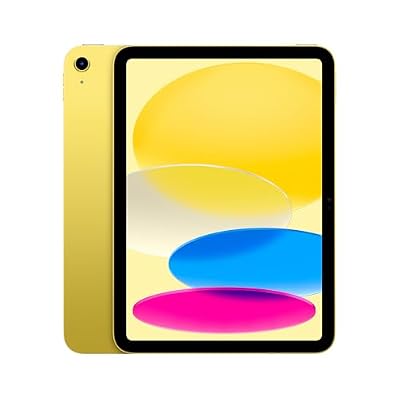
Apple iPad 11-inch: A16 chip, 11-inch Model, Liquid Retina Display, 128GB, Wi-Fi 6, 12MP Front/12MP Back Camera, Touch ID, All-Day Battery Life — Yellow
Included for 'GrandPad vs iPad for Seniors' because the listing specifies 11-inch Model and Liquid Retina Display, details this guide uses to compare options.
View on AmazonHead-to-head comparison
| Factor | GrandPad | iPad |
|---|---|---|
| Out-of-box simplicity | Very simple, large buttons, limited choices | Standard interface; needs setup to simplify |
| Cost structure | Ongoing monthly subscription including data | One-time device purchase, optional cellular plan |
| Internet | Built-in cellular, no Wi-Fi setup needed | Wi-Fi models, or cellular models with a separate plan |
| Apps | Curated built-in features only | Full app store |
| Calling and security | Private family network, strangers cannot call | Can be restricted with settings, but open by default |
| Accessibility tools | Large text and simple layout by design | Extensive: magnifier, screen reader, captions, hearing aid support |
| Telehealth and banking | Limited or not available | Supported through apps and browser |
| Support | Dedicated senior-focused support line | General support; family often helps |
| Family management | Family app to share photos and manage contacts | Remote help possible through settings and screen sharing |
Who a GrandPad suits
A GrandPad tends to suit seniors who have never used a smartphone or tablet and have no desire to learn, those with early memory changes who would be confused by an open system, those without home Wi-Fi, and families who live far away and cannot provide hands-on tech support. The private network is a meaningful protection against scam calls and messages, a real concern for older adults.
Who an iPad suits
An iPad tends to suit seniors with some tech comfort or a willingness to learn, those who want to do more than call and view photos, such as reading library books, joining telehealth visits, managing prescriptions, or following hobbies, and families with someone nearby who can help. Its accessibility features are among the most comprehensive available, which matters for low vision and hearing loss.
Cost over time
The iPad has a higher upfront cost, but no required monthly fee if used on Wi-Fi. A GrandPad spreads cost over monthly payments. Over two or three years, the subscription total can exceed the price of an iPad plus a case, but it includes data and support. The fair comparison adds up the iPad, a protective case, any cellular plan, and the value of family time spent on setup and support.
Making an iPad more senior-friendly
- Increase text size and turn on bold text.
- Remove extra apps from the home screen and use large icons.
- Restrict calls and messages to contacts, and silence unknown callers.
- Use guided access to lock the iPad into a single app when needed.
- Pair with a sturdy case that includes a stand and handle.
- Enable screen sharing so family can help remotely.
Frequently asked questions
Which is better for someone with dementia?
In early stages, the GrandPad’s closed simplicity is often easier. As needs change, either may give way to devices with auto-answer video calls that require no interaction.
Can a GrandPad be used for doctor video visits?
Telehealth support depends on the platform the doctor uses; a closed system may not support it. If telehealth is important, confirm before choosing, or opt for an iPad.
Bottom line
Choose a GrandPad when simplicity, built-in data, scam protection, and dedicated support matter more than flexibility, especially for tech-new seniors or families far away. Choose an iPad when the senior wants a broader range of uses, needs strong accessibility tools, or has family nearby to set it up. Either works best when family stays involved.
Related Reviews & Guides



Best One-Handed Cutting Boards for Seniors with Arthritis
Best Desktop CNC Machines for Home Workshops