Last Updated: October 7, 2026
- Best 32-Inch 4K Monitors for Sharp, Comfortable Work and Play
- What 4K looks like at 32 inches
- Choose by what matters most
- Panel types: the trade-offs behind the picture
- Refresh rate and ports: match the whole setup
- Ergonomics and desk fit: check before buying
- Shortlist by use, not by headline specifications
- Price, setup, and the final decision
Best 32-Inch 4K Monitors for Sharp, Comfortable Work and Play
The best 32-inch 4K monitor for most people is an IPS model with a height-adjustable stand, USB-C if you use a laptop, and a refresh rate of at least 60Hz; choose VA for stronger contrast, OLED for premium gaming and deep blacks, or a faster IPS display for a versatile work-and-play setup.
At 32 inches, 4K provides crisp text and detailed images, but comfort depends just as much on viewing distance, scaling, desk depth, and stand fit as on resolution. The right pick is the one that suits what you do and the space where you’ll use it.

LG 32U701B-B 32-inch Ultrafine 4K UHD 60Hz HDR10 HDMI DP Computer Monitor
Included for 'Best 32-Inch 4K Monitors for Sharp, Comfortable Work and Play' as a relevant option in this category; details come from the product listing.
View on Amazon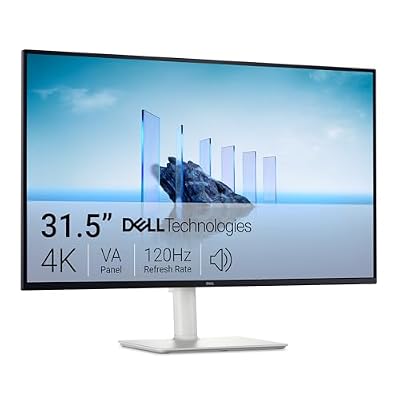
Dell 32 Monitor S3225QS, 4K UHD VA, 120Hz, FreeSync Premium, Eye Comfort
Included for 'Best 32-Inch 4K Monitors for Sharp, Comfortable Work and Play' because the listing specifies 4K UHD VA and 120Hz, details this guide uses to compare options.
View on Amazon
LG 32UR550K-B 32-inch Ultrafine 4K UHD (3840 x 2160) Computer Monitor, HDR10, 60Hz, HDMI, DisplayPort, Tilt/Height/Pivot Adjustable Stand, Black
Included for 'Best 32-Inch 4K Monitors for Sharp, Comfortable Work and Play' because the listing specifies HDR10 and 60Hz, details this guide uses to compare options.
View on Amazon
Samsung 32" ViewFinity S7 (S71H) 4K UHD IPS HDR10 High Resolution Monitor
Included for 'Best 32-Inch 4K Monitors for Sharp, Comfortable Work and Play' as a relevant option in this category; details come from the product listing.
View on AmazonWhat 4K looks like at 32 inches
A 32-inch 4K screen has about 138 pixels per inch (PPI). That is dense enough for fine text and image detail, while its larger physical area makes working at 4K more comfortable than on a small, high-density display. Many people use operating-system scaling—often around 125% to 150%—to keep menus readable. Scaling changes the effective size of interface elements, not the monitor’s native resolution.
For a comfortable view, plan on sitting roughly 24–36 inches from the screen, then adjust text size and distance to suit your eyesight. A desk only 20 inches deep can force the display too close, especially if the stand takes up space. A depth of about 28–30 inches gives more room to position the monitor and keyboard; a monitor arm can free some desk surface, provided the desk can support its clamp.
Choose by what matters most
| Your situation | Best fit | What to check |
|---|---|---|
| Office work, documents, and browsing | IPS, 60–75Hz | Height adjustment, clear text, and USB-C if connecting a laptop |
| Movies or games in a dim room | VA or OLED | Black levels, reflections, and warranty terms for OLED burn-in |
| PC gaming with a powerful graphics card | IPS, VA, or OLED at 120Hz or higher | Adaptive sync, supported refresh rate over your chosen connection, and graphics-card performance |
| One-cable laptop workspace | IPS with USB-C | USB-C power delivery, video support, and any built-in USB hub |
| Shallow desk or limited reach | Any panel with a compact stand or arm mount | Stand footprint, VESA compatibility, and space to sit at a comfortable distance |
Panel types: the trade-offs behind the picture
| Panel type | Strengths | Trade-offs | Best for |
|---|---|---|---|
| IPS | Consistent color and viewing angles; broad choice of models | Blacks can look gray in a dark room; contrast is usually less dramatic than VA or OLED | Work, shared viewing, and all-around use |
| VA | Higher contrast and darker-looking blacks than typical IPS | Some models show slower dark transitions or less consistent color off-axis | Movies and contrast-focused use |
| OLED | Per-pixel lighting, deep blacks, and very fast response | Higher cost; static interface elements can present a burn-in risk over time | Premium gaming and dark-room entertainment |
Panel labels are a starting point, not a guarantee of picture quality. Brightness, coating, color calibration, and the specific panel design matter too. If your room gets daylight, look for a screen that can reach comfortable brightness without relying on glossy reflections. For long work sessions, a matte finish may be easier to live with.
Refresh rate and ports: match the whole setup
At 60Hz, the monitor refreshes up to 60 times per second—fine for office tasks, films, and casual gaming. A 120Hz or 144Hz model can make scrolling and gameplay feel smoother, but it costs more and needs a computer capable of sending a high-refresh 4K signal. Check the monitor’s specifications for the refresh rate supported at 3840 × 2160 over each input; not every port or cable combination supports the maximum.
HDMI and DisplayPort are common for desktop PCs and consoles. USB-C can carry video and data and, on some monitors, charge a connected laptop. Check the USB-C power-delivery wattage against your laptop’s needs: a low-power port may still display video but charge slowly or fail to keep up under load. A built-in USB hub is useful for a keyboard, mouse, or webcam, but it may require connecting a separate USB upstream cable.
Ergonomics and desk fit: check before buying
A 32-inch monitor is about 27.9 inches wide and 15.7 inches tall before accounting for its frame and stand. Measure your desk’s usable width, not just its advertised width, and leave a little space for speakers, lighting, or other equipment. Most 32-inch screens are too wide for a typical single-monitor laptop stand area but fit comfortably on many desks around 48 inches wide.
- Desk depth: Aim for about 28–30 inches if possible. On a shallower surface, measure the stand’s front-to-back footprint and make sure you can still place your keyboard and sit back from the screen.
- Stand adjustment: Height adjustment helps position the top of the screen at or slightly below eye level. Tilt is useful; swivel and pivot matter more if you share the screen or rotate it for specific tasks.
- VESA mounting: If using an arm, confirm the monitor’s VESA pattern and the arm’s weight capacity. Include the monitor’s weight without its stand when checking compatibility.
- Glare and placement: Avoid placing the screen directly opposite a bright window where reflections land in your line of sight. A slight angle or repositioned lamp can make more difference than a higher brightness setting.
The stand is part of the purchase, not a minor accessory: some bundled stands offer only tilt, which can leave the screen too low or too high. If the stand lacks height adjustment, budget for a stable riser or compatible arm and account for the extra footprint or mounting requirements.
Shortlist by use, not by headline specifications
For a home-office all-rounder
Choose a 32-inch 4K IPS monitor with a height-adjustable stand, a matte screen, and 60–75Hz refresh. Prioritize text clarity, comfortable brightness, and a practical port selection over gaming features you will not use. A USB-C model is convenient if you regularly dock a laptop at the desk.
For games and everyday work
Look for 120Hz or higher, adaptive sync, and a connection that supports 4K at the monitor’s advertised refresh rate. Fast IPS is a versatile choice for bright rooms and varied use; VA favors contrast, while OLED is appealing when image quality and response matter more than price and you can manage static desktop content thoughtfully.
For films and low-light viewing
Consider VA for a more affordable contrast-focused screen or OLED for the deepest blacks and strongest pixel-level contrast. Check how the screen handles reflections and whether its brightness suits your room. If it will double as a work monitor with static toolbars all day, weigh OLED’s image advantages against its long-term burn-in considerations.
Price, setup, and the final decision
As a broad market guide, mainstream 32-inch 4K IPS and VA models usually fall around $300–$600, while higher-refresh gaming displays and premium OLED options can cost considerably more. Features such as USB-C charging, a fully adjustable stand, and a strong warranty can justify paying more if they solve a real problem in your setup.
Before ordering, confirm the external dimensions, stand footprint, weight, VESA compatibility, and return policy. Keep the box until you have checked for dead pixels, connection issues, and stand stability. A 32-inch monitor is manageable for one person to position carefully, but its broad panel is awkward to carry through tight hallways; use two hands and avoid pressing on the screen.
For most shoppers, the dependable choice is a 32-inch 4K IPS monitor with a height-adjustable stand and the ports their computer actually supports. Move to VA for stronger contrast, OLED for premium dark-room image quality, or high-refresh IPS, VA, or OLED when smooth gaming is a priority. Measure the desk and verify the connection first; those checks are more useful than chasing a specification your setup cannot use.
Related Reviews & Guides





Drive Medical vs Golden Technologies Power Wheelchair
How to choose the best portable oxygen concentrator for elderly parents