Last Updated: September 26, 2026
Keeping tabs on a parent’s blood pressure used to mean asking them to read numbers over the phone, hoping they wrote them down right. Connected blood pressure monitors change that: readings are sent automatically to an app or portal, where family caregivers and doctors can see them. For caregivers who live far away, that can mean earlier warning of problems and fewer worried calls. Here is what to look for in a monitor designed for remote tracking.
How remote blood pressure tracking works
Connected monitors send readings in one of three ways:
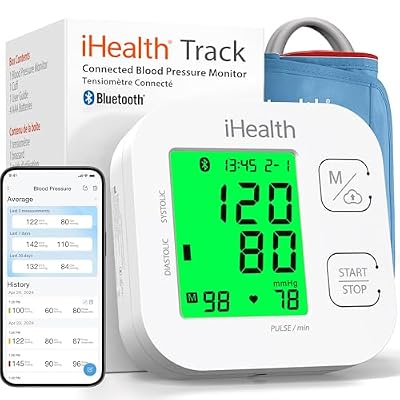
iHealth Track Smart Upper Arm Blood Pressure Monitor with Wide-Range Cuff
Included for 'Best Blood Pressure Monitor for Caregivers Tracking Remotely' as a relevant option in this category; details come from the product listing.
View on Amazon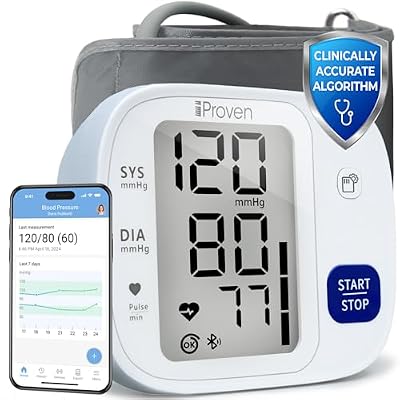
iProven Bluetooth Blood Pressure Monitor for Home Use with App Integration
Included for 'Best Blood Pressure Monitor for Caregivers Tracking Remotely' as a relevant option in this category; details come from the product listing.
View on Amazon
Greater Goods Bluetooth Blood Pressure Monitor for Home Use, Upper Arm Cuff
Included for 'Best Blood Pressure Monitor for Caregivers Tracking Remotely' because the listing specifies Upper Arm Cuff, details this guide uses to compare options.
View on Amazon
Wazhel Upper Arm Blood Pressure Monitor for Home Use, APP Tracking Share
Included for 'Best Blood Pressure Monitor for Caregivers Tracking Remotely' because the listing specifies APP Tracking Share, details this guide uses to compare options.
View on Amazon| Connection | How it works | Pros | Cons |
|---|---|---|---|
| Bluetooth | Syncs to a smartphone app nearby | Common, affordable | Needs the parent’s phone and app open |
| Wi-Fi | Uploads directly over home internet | No phone needed | Requires Wi-Fi setup and a stable network |
| Cellular | Built-in SIM sends readings automatically | Easiest for the user; works anywhere | Usually through a monitoring program or subscription |
For older adults who do not use smartphones, a cellular monitor is often the simplest option: they take a reading, and it is sent automatically.
Sharing with caregivers
Check whether the app lets multiple people view readings, send alerts for readings outside set ranges, and export reports for doctors. Some systems let the caregiver receive a notification if no reading has been taken for a day, which is a helpful reminder system.
Remote patient monitoring programs
Many doctors’ offices and health systems offer remote patient monitoring. The practice provides a cellular blood pressure monitor, readings go to the practice and clinical staff watch for concerning trends. Medicare Part B covers remote patient monitoring when ordered by a clinician for a qualifying condition, subject to usual cost sharing. For caregivers, this can be the best of both worlds: professional oversight and family access if the patient consents.
Features that matter
- Validated upper-arm cuff for accuracy.
- Correct cuff size; measure the upper arm first.
- One-button operation and a large display.
- Irregular heartbeat indicator, useful for many older adults.
- Multi-user profiles if a couple shares one monitor, to keep data separate.
- Caregiver alerts for high or low readings and missed readings.
Setting thresholds with the doctor
Alerts only help if they are set sensibly. Ask the parent’s doctor what ranges should prompt a call to the office and what should prompt emergency care. Very high readings with symptoms such as chest pain, severe headache, confusion or weakness, or very low readings with fainting, need emergency help. Put these thresholds in writing for both the parent and caregivers.
Good measurement habits at a distance
Help the parent build a routine: same times each day, seated and rested for five minutes, arm on a table at heart level, two readings a minute apart. A printed card next to the monitor with these steps helps. A video call can be a good way to watch a first reading and correct technique.
When readings stop arriving
Gaps in the data are the most common frustration. With Bluetooth monitors, the phone may have been off, out of range or the app closed. With Wi-Fi models, a new router or password change breaks the link. Put the setup details on a card taped to the monitor, and ask a neighbor or grandchild who visits to check the connection. A gap of a day or two is usually a tech glitch, but a longer silence is a good reason to call.
Privacy and consent
Health data belongs to the patient. Ask the parent’s permission to view readings, and agree on who sees what. If they have cognitive impairment, involve whoever holds health care power of attorney. Choose apps with clear privacy policies.
Costs
- Bluetooth upper-arm monitors: about $50 to $120.
- Wi-Fi monitors: about $80 to $180.
- Cellular monitors: often provided through RPM programs; retail versions may involve a subscription.
Medicare Advantage over-the-counter allowances and FSA or HSA funds can often be used.
FAQ
Can I see my mom’s blood pressure readings on my phone?
Yes, if she uses a connected monitor with an app that allows sharing, and she agrees. Cellular monitors are easiest if she does not use a smartphone.
Does Medicare pay for remote blood pressure monitoring?
Medicare Part B covers remote patient monitoring services when a clinician orders them for a qualifying condition, and the program usually supplies the device. Cost sharing applies. Ask her doctor’s office.
Bottom line
For remote caregivers, pick a validated upper-arm monitor that sends readings automatically, preferably via cellular for non-smartphone users, with caregiver alerts set to thresholds agreed with the doctor. Ask about remote patient monitoring programs, which may provide the device and professional oversight.
Related Reviews & Guides


Best Bidet for Seniors with Limited Mobility
Best Health Monitoring Smartwatch for Seniors With Heart Disease