Last Updated: September 26, 2026
A smart speaker is one of the few pieces of technology that asks almost nothing of the person using it. There is no screen to read, no button to find, and no password to remember in daily use: the older adult simply speaks. That makes smart speakers unusually well suited to people with low vision, arthritis, or limited tech experience. They can set medication reminders, call family hands-free, play audiobooks and old radio programs, answer questions, and control lights. This guide covers which features matter most for seniors, how to set one up, and where the limits and privacy concerns lie.
What seniors actually use smart speakers for
Surveys and pilot programs in senior housing show a consistent pattern. The most used features are asking the time, date, and weather; playing music or audiobooks; setting reminders for medications and appointments; making hands-free calls to family; and turning lights on and off. For people living alone, the ability to call out by voice when a phone is out of reach is often the feature families value most.

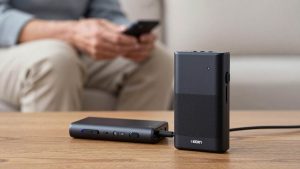
SIMOLIO Wireless TV Speakers for Hard of Hearing, TV Sound Amplifier
Included for 'Best Smart Speaker for Seniors 2026' because the listing specifies TV Sound Amplifier, details this guide uses to compare options.
View on Amazon
SEREONIC DUAL Wireless TV Listening Speaker – Portable Wireless Speakers Ideal for TV Watching without The Blaring Volume – Wireless Smart TV Speaker for Hard of Hearing, Elderly, and Seniors.
Included for 'Best Smart Speaker for Seniors 2026' because the listing specifies Wireless Smart TV Speaker for Hard of Hearing and Elderly, details this guide uses to compare options.
View on AmazonFeatures to compare
| Feature | What to look for | Why it matters |
|---|---|---|
| Speaker quality | Clear mid-range, loud enough for mild hearing loss | Voices should be easy to understand, not just loud |
| Microphone range | Far-field mics that pick up soft speech across a room | Older voices can be quieter |
| Hands-free calling | Calls to contacts and, in some regions, landline and mobile numbers | Reach family without a phone |
| Reminders and routines | Recurring reminders, family can set remotely | Medication and appointment support |
| Screen option | Speaker only or smart display | Displays add clock and video but need more interaction |
| Privacy controls | Physical mic mute, voice history deletion | Peace of mind |
| Emergency features | Calling saved contacts, or subscription emergency services | Help when a phone is out of reach |
Important limitation: emergency calls
Smart speakers are not medical alert systems. Many cannot dial emergency services directly, and those that offer emergency help usually require a paid subscription. A speaker also only works if the person can speak clearly and is within earshot. For someone at risk of falls, a wearable medical alert device remains the more reliable option, and a smart speaker can be a helpful addition rather than a replacement.
Choosing for specific needs
Low vision or blindness
A speaker-only model is ideal. It can read audiobooks, news, and time aloud. Many libraries and the National Library Service for the Blind and Print Disabled offer talking book services that work with smart speakers.
Hearing loss
Choose a larger speaker with clear voice reproduction, or a smart display that shows captions on screen. Adjust the speaking rate of the assistant to slower if available.
Memory changes
Routines such as a morning announcement of the date, weather, and the day’s appointments can orient someone with early memory loss. Family can set reminders remotely. Keep the wake word and commands simple and consistent.
Mobility limitations
Pairing a speaker with smart plugs and bulbs lets someone turn on lights before getting out of bed, reducing nighttime fall risk.
Setup tips
- Place the speaker where the person spends the most time, away from the TV and kitchen noise.
- Add a second speaker in the bedroom for nighttime reminders and calls.
- Set up the account under a family member’s email but name the device for the senior.
- Write a short card of useful commands in large print and leave it beside the speaker.
- Enable voice recognition so reminders and calls go to the right person in shared homes.
Privacy considerations
Smart speakers listen for the wake word and send requests to the cloud. Review privacy settings, turn on automatic deletion of voice recordings if offered, and show the senior how to use the mute button. Discuss comfort openly; some older adults are uneasy with an always-listening device, and that deserves respect.
Frequently asked questions
Can a smart speaker call 911?
Capabilities vary by device and region, and many cannot dial emergency services directly without a paid add-on. Do not rely on a speaker as the sole emergency plan.
Does the senior need a smartphone to use one?
Setup usually requires a smartphone app, but a family member can do this. Daily use needs only voice and a Wi-Fi connection.
Bottom line
For most seniors, a mid-size smart speaker with good voice clarity and far-field microphones, set up by family with reminders, favorite music, and calling contacts, is a simple, useful addition to daily life. Add a smart display for captions or video calls, pair it with smart plugs for lighting, and keep a wearable medical alert for emergencies.
Related Reviews & Guides

Best LED Headlights for Brighter, Better-Fitting Upgrades
Best Astell&Kern Audiophile Portable Music Players