Last Updated: September 26, 2026
A wearable panic button, also called a medical alert or personal emergency response device, lets an older adult call for help with a single press, wherever they are in the home or, with some devices, anywhere they go. For seniors living alone, it can mean the difference between getting help in minutes and waiting hours after a fall or sudden illness. This guide explains the types of panic buttons, key features and how to choose a system your loved one will actually wear.
How Wearable Panic Buttons Work
When the wearer presses the button, the device connects to either a professional monitoring center, family members or both. In monitored systems, a trained operator speaks to the person through the device or base station, assesses the situation and calls family or emergency services as needed. Unmonitored systems call or text a list of contacts.

SecuLife Medical Alert Pendant for Seniors, Alerts Go Direct to Family, No Call Center, Auto Fall Detection, GPS Tracking, 2-Way Calling, Water Resistant Necklace
Included for 'Best Wearable Panic Button for Elderly' because the listing specifies Alerts Go Direct to Family and No Call Center, details this guide uses to compare options.
View on Amazon
Medical Guardian MGMini Medical Alert Device for Seniors | Subscription Required | SOS Button, Emergency Location Assistance, 24/7 Monitoring | Pearl
Included for 'Best Wearable Panic Button for Elderly' because the listing specifies Subscription Required and SOS Button, details this guide uses to compare options.
View on AmazonTypes of Devices
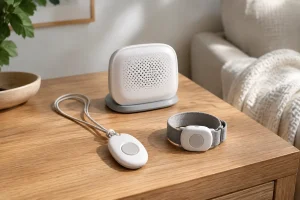
In-home pendant or wristband with base station
The button communicates with a base unit connected to a landline or cellular network. Range usually covers the home and garden, often 300 to 1,000 feet.
Mobile GPS panic buttons
Built-in cellular and GPS let the device work anywhere with coverage. Ideal for active seniors.
Smartwatch-style alerts
Look like ordinary watches with an SOS function, often with fall detection and step counting.
Wall-mounted buttons
Fixed buttons in bathrooms or near the bed supplement wearables for times when the device is off.
| Type | Coverage | Device price range | Monthly fee |
|---|---|---|---|
| In-home pendant/wristband | Home and yard | $0–$100 | $20–$35 |
| Mobile GPS button | Anywhere with signal | $50–$200 | $25–$45 |
| Smartwatch-style | Anywhere with signal | $100–$300 | $20–$40 |
| Wall button add-on | Fixed location | $20–$50 | Usually included |
| Unmonitored family-alert device | Varies | $30–$150 | $0–$15 |
Features to Prioritize
Automatic fall detection
Detects a fall and calls for help even if the person cannot press the button, for example if unconscious or confused. Adds cost and may produce occasional false alarms, but many families find it worthwhile.
Waterproofing
Bathrooms are a high-risk area. The device should be waterproof so it can be worn in the shower.
Two-way voice through the wearable
Speaking through the pendant itself, not just the base station, helps if the person falls far from the base.
Battery life
In-home buttons often last years on a battery. Mobile devices need charging every one to five days, which can be a problem for people with memory issues.
Comfort and style
A device that looks discreet and feels comfortable is more likely to be worn. Offer a choice of pendant, wristband or clip.
Contract terms
Check for long contracts, cancellation fees and equipment charges. Many reputable providers offer month-to-month plans.
Choosing by Lifestyle
Mostly at home: an in-home pendant with fall detection and long battery life. Active, goes out alone: a mobile GPS button. Dislikes medical-looking devices: smartwatch-style. Memory problems: a device with long battery life and fall detection, plus caregiver notifications. High fall risk: wearable with fall detection plus wall buttons in bathroom and bedroom.
Encouraging Daily Wear
- Involve your loved one in choosing the style.
- Explain that it helps them stay independent at home.
- Set a routine for putting it on in the morning.
- Place a charger by the bed for mobile devices.
- Test the button monthly together so it feels familiar.
Questions to Ask a Provider
Before signing up, ask a few direct questions. How quickly does the monitoring center typically answer a call? Are operators trained in medical and elderly care situations? What happens if the device loses signal or the battery runs low? Is there a fee for replacing a lost or damaged pendant? Can family members receive notifications as well as the monitoring center? Is there a trial period? Clear answers help you compare providers and avoid surprises later.
Keeping Emergency Information Ready
A panic button works best when responders have the right information. Give the provider an up-to-date list of medical conditions, medications, allergies and emergency contacts. Consider a lockbox with a spare key outside the home, with the code held by the monitoring center, so paramedics can get in without breaking down a door. Update details whenever health or contacts change.
FAQ
Do panic buttons work without a landline?
Yes. Many systems use built-in cellular connections and do not need a landline.
Is fall detection worth the extra cost?
For people at high risk of falls, or those living alone, many families consider it worthwhile because it can summon help when the person cannot press the button.
Bottom line
The best wearable panic button for an elderly person is waterproof, comfortable, easy to press and suited to their lifestyle, with fall detection for those at higher risk. Choose in-home or mobile coverage based on how often they go out, check contract terms and encourage daily wear. It is a small device that can bring help fast.
Related Reviews & Guides

Hospital Bed vs Adjustable Bed Which Is Better for Seniors
Best Low-Sodium Meal Kits for Seniors with Hypertension