Last Updated: October 4, 2026
- Top Pick: Smartphone Safety for Seniors: Simple Steps to Avoid Scams, Protect Your Privacy, and Use Your Phone Safely (The Senior Safety Project: Digital Protection for Seniors & Families)
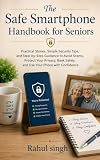
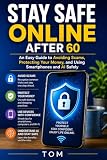
- Best Value: Online Safety for Seniors: The Complete Guide to Spotting Scams, Avoiding Identity Theft, and Using the Internet, Smartphones, and Social Media with Confidence
- Premium Choice: Cyber Safety for Seniors: How to Avoid Scams, Secure Your Devices, and Protect Your Money
Top Smartphone Safety Seniors Avoiding Scams Picks for 2026
Here are our current top smartphone safety seniors avoiding scams picks, compared on real Amazon owner reviews, price, and features. Live prices update below.
Smartphone safety for elderly users has become a family conversation that can no longer wait. Older adults lose billions of dollars to fraud every year, and the smartphone is now the front door for most of it — fake calls, scam texts, phishing emails, and apps that quietly harvest personal information. The good news is that a smartphone configured thoughtfully, plus a senior who knows the common scam scripts, is a hard target. This guide covers the scams aimed specifically at seniors, a practical privacy and setup checklist you can work through in an afternoon, and exactly what to do if a scam has already happened.
As an Amazon Associate we earn from qualifying purchases at no extra cost to you.






The Scams Most Often Aimed at Seniors
The Grandparent Scam
A caller — increasingly using AI-cloned voices — claims to be a grandchild in trouble: arrested, in an accident, stranded abroad. They beg for money and for secrecy (“please don’t tell Mom”). The urgency and the secrecy are the tells. Agree on a family code word in advance, and make “hang up and call the grandchild’s real number” the automatic family rule.
Tech Support Scams
A pop-up, text, or call claims the phone or computer is infected and a “technician” needs remote access or payment. Real companies never call you about a virus, never ask for remote access out of the blue, and never take payment in gift cards.
Government and Bank Impersonation
Callers pose as Social Security, Medicare, the IRS, or the bank’s fraud department, threatening arrest or frozen benefits unless the senior “verifies” information or moves money to a “safe account.” Government agencies initiate contact by mail, not by threatening phone calls, and no legitimate bank asks you to move money to protect it.
Phishing Texts and Emails (Smishing)
Fake delivery notices, unpaid toll alerts, and “suspicious activity” messages carry links to counterfeit login pages. The safe habit is simple and absolute: never tap links in unexpected messages — go to the app or website directly instead.
Romance Scams
Scammers build months-long online relationships with lonely seniors before the requests for money begin, and victims are often too embarrassed to tell family. Warm, judgment-free family contact is the best prevention; isolation is the scammer’s ally. If a parent has become withdrawn, our article on depression in seniors covers warning signs and support resources.
Prize, Lottery, and Charity Scams
“You’ve won — just pay the fees” and fake disaster charities round out the list. Any prize that costs money to claim is a scam, full stop.
Privacy and Security Setup Checklist
Sit down together and work through this list. None of it requires technical skill, and each item closes a real door:
- Screen lock: Set a PIN, fingerprint, or face unlock. A lost unlocked phone exposes everything.
- Software updates: Turn on automatic updates for the system and apps — most attacks exploit phones that are simply out of date.
- Call screening and spam filtering: Enable the carrier’s spam-call blocking and the phone’s built-in screening for unknown numbers. Let unknown callers go to voicemail; legitimate callers leave messages.
- Message filtering: Turn on spam filtering for texts, and show your parent how to report and block junk senders.
- App permissions: Review which apps can use the microphone, camera, location, and contacts, and revoke anything that has no reason to ask.
- Two-factor authentication: Enable it on email and banking first — those two accounts are the keys to everything else.
- Strong, unique passwords: A written notebook kept safely at home beats reused passwords everywhere.
- Trusted contact: Add a family member as an emergency contact, and consider trusted-contact arrangements at the bank so unusual transfers trigger a call.
- Remove what isn’t used: Fewer apps means fewer permission holes and less confusion.
If the smartphone itself is more phone than your parent wants, a simpler handset from our large button phones for the elderly guide dramatically shrinks the attack surface, and a senior-friendly tablet kept at home can carry the video calls and browsing instead. Many families split the duties exactly that way, with face-to-face calls handled by a dedicated video call device.
Habits That Keep Seniors Safe Long-Term
Settings help, but habits protect. The three rules worth repeating until they are reflexes: slow down — every scam manufactures urgency, and anything truly urgent can survive a ten-minute pause; verify independently — hang up and call the bank, agency, or relative back on a number you already have, never one the caller provides; and never pay in gift cards, wire transfers, or cryptocurrency — no legitimate business or agency is paid that way. Make scam stories normal dinner-table conversation, because seniors who hear about scams report them faster and hide them less. A regular video call also doubles as a check-in where odd requests (“my new friend needs a loan”) surface naturally.
What to Do If Your Parent Has Been Scammed
Act quickly and skip the blame — shame is why most elder fraud goes unreported.
- Stop the bleeding: Call the bank and card issuers immediately to freeze accounts, reverse pending transfers, and cancel compromised cards. If gift cards were bought, contact the issuing retailer with the card numbers and receipts right away.
- Change passwords: Start with email and banking, from a clean device if remote-access software may have been installed.
- Clean the phone: Remove any unfamiliar apps, especially remote-access tools the scammer instructed your parent to install.
- Report it: File with the FTC at ReportFraud.ftc.gov, the FBI’s IC3 for internet crimes, and local police if money was lost. Reports build the cases that shut operations down.
- Consider a credit freeze: Freezing credit with the three bureaus is free and blocks new accounts being opened in your parent’s name.
- Watch for the follow-up scam: Victims land on “sucker lists,” and “fund recovery services” that call afterward are almost always the same criminals returning for round two.
Smartphone safety is one piece of a broader safety net — for emergencies beyond fraud, see our guides to medical alert systems and senior emergency button pendants.
Frequently Asked Questions
What is the most common phone scam aimed at the elderly?
Impersonation scams lead the pack — callers posing as government agencies, banks, tech support, or panicked grandchildren. They all share two ingredients: manufactured urgency and an unusual payment method.
How can I block scam calls on my parent’s phone?
Combine three layers: the carrier’s free spam-blocking service, the phone’s built-in silencing of unknown callers, and a habit of letting unfamiliar numbers go to voicemail. No single layer catches everything.
Should seniors use banking apps on their phones?
Generally yes — official banking apps with two-factor authentication are safer than links arriving by email or text, and transaction alerts help spot fraud early. The rule is to only ever enter banking details inside the official app.
How do I talk to my parent about scams without scaring them?
Frame it as criminals being professionals rather than victims being foolish, share stories about other people, and agree on simple family rules — like the code word and the call-back habit — rather than long lists of warnings.
Is it safe for seniors to use public Wi-Fi?
Casual browsing is fine, but banking and shopping should wait for home Wi-Fi or cellular data, which are much harder for strangers to snoop on.
Related Reviews & Guides





Electric Can Opener Hands Free Senior Review

9 Best Large Print Keyboards for Seniors: Easy to See & Use