Last Updated: October 4, 2026
- Top Pick: LogicMark Freedom Alert, Landline Personal Emergency Device, 2-Way Call with Family and Police for Home Safety, Device for Seniors and The Elderly
- Best Value: No Subscription, No Contract, No Monthly Fees, Senior Elderly Medical Alert
- Premium Choice: Medical Guardian MGHome Cellular | Medical Alert System for Seniors at Home, Caregiver Call Button | Fast, Reliable 4G Coverage & 24/7 Emergency Operator Care | Monthly Subscription Required
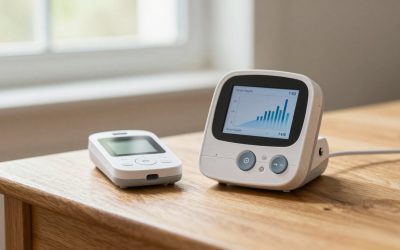
Choosing between a landline medical alert and a cellular medical alert is less about which technology is newer and more about how your home is connected. A landline system uses an existing wired telephone connection to reach a monitoring center or programmed contacts. A cellular system uses a mobile network, much like a cellphone, so it can work in homes without a traditional phone jack.
The real decision is whether you value a potentially lower long-term cost and simple home-only setup, or easier installation, portability, and independence from a landline. You should also consider who answers an emergency call, whether the system includes fall detection, and what happens during a power or network outage. The best choice for 2026 may be different for a renter in a small apartment than for a homeowner who has used the same phone service for decades.
As an Amazon Associate we earn from qualifying purchases at no extra cost to you.



Quick Verdict
Choose a landline medical alert if the user has dependable wired phone service, spends nearly all their time at home, and wants a straightforward device with little or no monthly service charge. These systems can be especially appealing to budget-conscious households that already have a landline.
Choose a cellular medical alert if the home does not have a landline, the user may move between rooms or properties, or caregivers want a more flexible system. Cellular units often support GPS, mobile backup, fall detection, and professional monitoring, although those features commonly require a monthly subscription.
Neither option is automatically safer. Coverage at the exact home, battery life, water resistance, button range, and response method matter more than the label on the box.
Side by Side
| Factor | Landline medical alert | Cellular medical alert |
|---|---|---|
| Comfort | Usually a lightweight pendant or wrist button, often about 1–2 oz | Similar wearable comfort; mobile pendants may weigh about 1.5–3 oz |
| Durability | Many buttons are water resistant; verify shower rating before use | Often water resistant, with some units designed for shower or outdoor use |
| Price range | About $100–$300 upfront; monitoring may be free or optional | About $50–$150 upfront, plus roughly $25–$50 per month for monitoring |
| Maintenance | Test the telephone connection and replace wearable batteries as directed | Recharge or plug in the base and wearable; maintain an active service plan |
| Space needed | Typically a base unit around 6–10 inches wide near a phone jack and outlet | Usually a base unit around 5–8 inches wide; some systems use only a wearable |
| Look | Often resembles a small home telephone accessory | May look more like a compact speaker, pendant, or GPS tracker |
| Resale | Equipment may retain value if compatible with current service | Lower resale potential if locked to a carrier or subscription platform |
| Best for | Homebodies with reliable landline service and a low recurring-cost goal | People without landlines, active seniors, renters, and families wanting professional monitoring |
| Emergency connection | Uses the wired phone network or programmed contacts | Uses a cellular network; coverage must be checked at the home |
Where Landline Medical Alert Wins
The biggest advantage of a landline system is predictable operation when a traditional phone line is available. The base station plugs into the phone jack, and pressing the wearable button connects the user to a monitoring center or a list of family members, depending on the system. There is no cellular signal to evaluate and often no data plan to manage.
Upfront pricing can also be attractive. A device such as the LogicMark Freedom Alert Landline Personal Emergency Device is listed at $299 and is designed for two-way calling with family and police. Other no-subscription, no-contract medical alert devices sell for about $150. Those prices may look high next to a subsidized cellular unit, but the absence of a monthly fee can make the total cost lower over time.
Landline systems are also easy to understand for someone who is comfortable with a home phone. The base station generally stays in one place, while the pendant or wrist button is worn around the house. That fixed setup can reduce app notifications, charging routines, and account management.
There are limits. A landline unit is usually intended for the home, not the grocery store or a walk around the neighborhood. It may also be vulnerable to a cut phone line or a household power outage unless the base station has battery backup. Before buying, confirm the wearable’s range, whether two-way voice works through the pendant, and whether the system calls 911 directly, a monitoring center, or personal contacts.
Where Cellular Medical Alert Wins
Cellular systems solve the most common landline problem: many homes no longer have wired phone service. A cellular base station can be placed near an outlet without a phone jack, and a mobile pendant can sometimes work away from the base unit. This makes cellular technology a better fit for a senior who visits family, spends time in the yard, or may move to another residence.
Cellular products are also more likely to offer modern safety features. Depending on the model and service plan, these can include automatic fall detection, GPS location, two-way voice, caregiver notifications, and a professional emergency operator. The Medical Guardian MGHome Cellular, for example, is marketed as a home system with 4G coverage, a caregiver call button, and 24/7 emergency operator care; its listed price is under $70, with a monthly subscription required. Treat that price as equipment or promotional pricing unless the seller clearly states the full recurring cost.
A cellular connection can be more convenient for family members, too. Some direct-to-family devices avoid a call center and send alerts to selected contacts. The SecuLife Medical Alert Pendant for Seniors is listed at $89 and advertises GPS tracking, automatic fall detection, two-way calling, water resistance, and no contract. A product with no monitoring center may be useful for a close-knit family, but relatives must be willing and able to answer alerts at any hour.
The trade-offs are recurring fees, charging, and signal dependence. A cellular medical alert can fail to connect in a weak-coverage area, just as a cellphone can. Ask which carrier’s network the device uses, whether the unit has battery backup, how long the battery lasts, and whether fall detection is included or costs extra. Automatic fall detection is helpful but should never replace wearing the manual help button.
Cost Over 5 Years
A five-year comparison makes the difference between purchase price and service price clear. A basic landline device costing $150–$300 may have a five-year equipment cost of roughly $150–$300 if it needs no subscription. If monitoring costs $20–$35 per month, the total becomes approximately $1,350–$2,400 over five years, before replacement batteries or accessories.
A cellular system may cost $50–$150 upfront and $25–$50 per month for monitoring. Over 60 months, that equals about $1,550–$3,150 total. Higher-priced plans may include fall detection, GPS, a mobile unit, or caregiver tools. Some family-contact cellular devices have no monthly charge, but the household then takes responsibility for responding to every alert.
These are planning ranges, not guarantees. Activation fees, equipment rentals, annual discounts, replacement pendants, and cancellation terms can change the total. Compare the complete 60-month cost, not just the large number shown on a product page.
Which One for Your Home
Small apartment
Cellular is usually the simpler choice if the apartment has no phone jack or if the resident wants a compact setup. A base station may occupy only a small section of a nightstand or counter, and a wearable can cover the bedroom, bathroom, and living area. Check cellular reception inside the building, especially in a concrete or below-grade apartment. If the apartment has strong landline service and the user never goes out alone, a landline device can cost less.
Family with kids or pets
Cellular may offer more flexibility when the senior moves around the yard, walks with a dog, or spends time visiting family. GPS and caregiver alerts can add useful context. However, choose a water-resistant wearable with a secure clasp and a simple charging routine. In a busy household, professional monitoring may be preferable to relying on a family member who could miss an alert while caring for children.
Rental
A cellular system avoids installing or transferring a landline and can move with the tenant. It is also less dependent on the landlord’s wiring. Before signing up, test the device in the bedroom and bathroom and understand the cancellation policy. A landline option makes sense only when the rental already includes dependable phone service and the resident expects to stay for several years.
Long-term home
A long-term homeowner with stable landline service may save money with a landline system, particularly when the user stays indoors. Confirm that the phone service remains active during an emergency and select a base station with backup power if available. For a homeowner who gardens, travels locally, or may eventually need GPS, a cellular system provides more room to adapt.
FAQ
Does a cellular medical alert work without Wi-Fi?
Most cellular medical alerts communicate through a built-in mobile connection rather than household Wi-Fi. They still need adequate cellular coverage and battery power. Ask the seller which network is used and whether the device can be tested and returned if reception is poor.
Can a landline medical alert call 911?
Some systems call a professional monitoring center, while others let the user program family, neighbors, or emergency services. Do not assume that every landline device connects directly to 911. Read the call sequence and test it with the provider’s permission.
Is fall detection worth paying extra for?
It can help when a person cannot press the button, but no fall detector identifies every fall. A manual button remains essential. Consider the user’s fall risk, willingness to wear the pendant, and whether the added monthly fee fits the household budget.
Which type is better during a power outage?
Neither type is automatically better. Look for battery backup in the landline base station and sufficient standby time in a cellular unit. Keep the wearable charged, test the system regularly, and ask the provider how alerts are handled when the home’s power, phone line, or cellular service is interrupted.
Related Reviews & Guides



Best medical alert pendant for dementia patients
Best wheelchair for air travel