Last Updated: October 9, 2026
- Top Picks at a Glance
- Who Needs a Large Button Phone—and What Type
- Landline Large Button Phones: What to Look For
- Senior Cell Phones: Key Models Compared
- Medical Alert Hybrid Devices
- Supporting Products for Communication and Safety
- Full Spec Comparison: Large Button Landlines
- Frequently Asked Questions
- Related Articles
- Related Guides
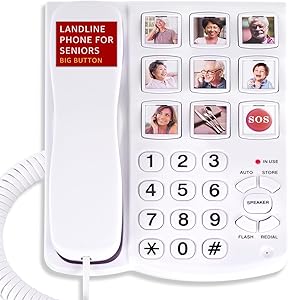
Large Button Phone for Elderly: Complete Buyer’s Guide (Landline, Cell, and Alert Hybrids)
A large button phone sounds like a simple purchase—until you’re standing in the aisle trying to figure out whether “big button” means 0.3 inches or 0.8 inches, whether the person you’re buying for needs amplification, and whether the emergency call function actually reaches someone useful. This guide organizes what matters.
We cover landlines, cell phones, and medical-alert hybrid devices, with concrete specs to compare and honest notes on where each type falls short.
As an Amazon Associate we earn from qualifying purchases at no extra cost to you.

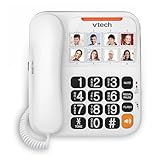
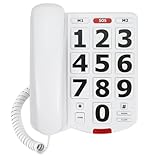


🛒 Best Price Today on Amazon
Prime members get fast, free shipping on everything above, plus member-only deals. New members get a 30-day free trial — cancel anytime.
Start 30-Day Prime Free Trial →See Today’s Amazon DealsTop Picks at a Glance
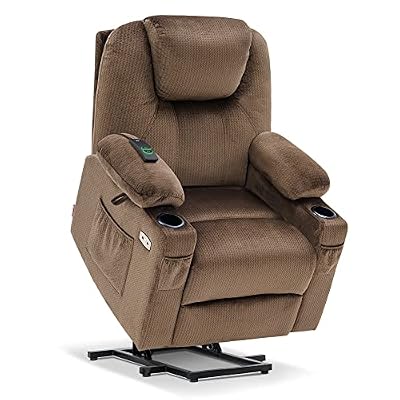
MCombo Small Power Lift Recliner Chair Sofa with Massage and Heat for Petite Elderly, 3 Positions, Cup Holders, and USB Ports, Extended Footrest, Fabric 7141 (Mocha)

soundfuse Foldable Rollator Walkers for Seniors with 16" Ergonomic Arc Seat | Sturdy Frame, Double Support Bar, 8" Wheels for All Terrain, Padded Seat, Dual Height Adjustable, Tool-Free Assembly

Carex 3.5 Inch Raised Toilet Seat with Arms, Elongated Toilet Seat Riser, Up to 250 lbs Capacity, Elevating & Raising Seat for Elderly & Handicap, Universal, Slip-Resistant with Padded Handles, White
As an Amazon Associate we earn from qualifying purchases. Product prices and availability are accurate as of the date/time indicated.
Who Needs a Large Button Phone—and What Type
The right device depends on the specific barrier, not just age. Start with the actual problem:
| Primary Issue | Best Device Type |
|---|---|
| Arthritic fingers, tremors—can’t accurately hit small keys | Landline with large physical buttons (0.6 in+) |
| Hearing loss—can hear phone ring but not conversation | Amplified phone (40+ dB gain) with HAC M4/T4 rating |
| Vision impairment—can’t read display or button labels | High-contrast buttons with tactile raised dots |
| Cognitive decline—too many features cause confusion | Simplified phone with 4–6 photo-speed-dial buttons max |
| Lives alone, fall risk—needs reliable emergency call | Medical alert hybrid or dedicated medical alert system |
| Still mobile, travels—needs portable option | Senior cell phone (Jitterbug Flip2, Doro 8080) |
If fall risk and emergency contact are the primary concern, compare standalone devices in our medical alert system comparison—dedicated alert devices outperform phone-based emergency buttons in reliability and response time.
Landline Large Button Phones: What to Look For
Button Size and Spacing
Marketing copy uses “big button” loosely. Meaningful minimum: 0.5 inches per key with 0.1 inch spacing between keys. Measure the product image against a ruler if specs aren’t listed. Keys should also have tactile edges—flat membrane keypads feel similar to a touchscreen and are harder for arthritic hands.
Amplification
Standard phones output 0 dB gain. Amplified phones for seniors should offer at least +30 dB on the handset and ideally +20 dB or more on the ringer (adjustable, so household members aren’t disturbed when volume isn’t needed). The highest-rated landlines reach +50 dB—appropriate for moderate-to-severe hearing loss.
HAC rating: M3/M4 and T3/T4 ratings indicate compatibility with hearing aids in microphone (M) and telecoil (T) modes. T4-rated phones work best with hearing aids equipped with a telecoil switch. If the person uses hearing aids, verify T-rating compatibility before buying.
Emergency/SOS Button
Most landline “senior phones” include an emergency button on the handset or base that auto-dials a pre-programmed number. Verify: Does it dial an actual contact, or a paid monitoring service? Does it announce itself (“Emergency call to John in 10 seconds”) giving the user a cancel window? Is the button recessed to prevent accidental dials?
Display Requirements
Minimum 1-inch character height on caller ID display. High-contrast (white on black or yellow on black) outperforms standard blue backlit displays for users with macular degeneration. Backlit keys matter for nighttime use.
Senior Cell Phones: Key Models Compared
| Model | Type | Key Feature | Approx. Price | Best For |
|---|---|---|---|---|
| Jitterbug Flip2 (Lively) | Flip cell | Urgent Response button, 5Star monitoring | $80 + plan | Active seniors, wants simple cell |
| Doro 8080 | Smartphone | Large icons, emergency alert, camera | $130 | Seniors comfortable with touchscreen |
| Consumer Cellular ZUMA Pro | Smartphone | Large fonts, easy setup via carrier | $70 + plan | Seniors with family on Consumer Cellular |
| Snapfon EZT50 | Basic cell | SOS button, long battery, no data plan req. | $60 | Minimal use, just calls and SOS |
Senior cell phones work well for mobile use but require a monthly plan. If the person lives at home and primarily needs to make and receive calls there, a corded or cordless landline is more reliable (no battery management, no signal issues) and typically $30–$80 as a one-time cost.
Medical Alert Hybrid Devices
These devices combine basic calling with 24/7 monitored emergency response—essentially a wearable or table-top device that can also make voice calls to family. Examples: Lively Mobile Plus, Medical Guardian Mini Guardian, Bay Alarm Medical SOS Home.
Advantage over a phone: They work when the person can’t reach the phone (post-fall on the floor, in the bathroom). The emergency function doesn’t depend on the user picking up and dialing—a button press connects to a dispatcher who can call for help.
Cost: $30–$50/month for monitored service after device purchase. Full comparison in our medical alert system comparison for seniors.
Supporting Products for Communication and Safety
Comfortable Seating Near the Phone
Seniors with mobility limitations often rush to answer calls and fall in the process. Placing a comfortable, easy-to-rise-from chair near the phone reduces this risk. A power lift recliner like the MCombo Power Lift Recliner (B0BG4ZH69G, $559.90) near the main phone station means the senior doesn’t need to rush from a deep seat. See our guide on recliner chair vs lift chair for comparison.
Raised Toilet Seat for Bathroom Call Prep
Auditory urgency (hearing the phone ring) is a documented trigger for rushing out of the bathroom, which is a fall context. A raised toilet seat reduces the time and effort of standing up. The Carex Raised Toilet Seat (B005J4E8IC, $40.99) adds 3.5 inches of height and supports up to 250 lbs. Full review: raised toilet seat with arms review.
Grab Bar Near Phone Station
A wall-mounted grab bar near the phone location (hallway, kitchen counter edge) gives a stable support point when rising to answer the phone. Ravinte Grab Bars (B0BZ41GW6Y, $19.99) are stainless steel with a 500 lb load rating. Installation guide at this guide on ada compliant bathroom grab bars.
Full Spec Comparison: Large Button Landlines
| Spec | Minimum for Senior Use | Premium Spec |
|---|---|---|
| Button size | 0.5 in | 0.75–1.0 in |
| Handset amplification | +30 dB | +50 dB |
| Ringer volume | 75 dB | 95+ dB (adjustable) |
| HAC rating | M3/T3 | M4/T4 |
| Caller ID display | 1 in character height | 2 in, high contrast |
| Speed dial capacity | 6 one-touch | 10–20 with photo labels |
| Emergency button | Single key, auto-dial one number | Calls multiple numbers in sequence, announces before dialing |
| DECT 6.0 cordless | Optional | Range 300–500 ft, multiple handsets |
Frequently Asked Questions
What makes a phone “senior-friendly” beyond large buttons?
Three factors beyond button size matter most: handset amplification (minimum +30 dB), a high-contrast display for caller ID and dialing, and a simplified interface. Phones with too many menu options or small secondary functions confuse users with early cognitive decline. The best senior phones have only the functions the person will actually use.
Do large button phones work with hearing aids?
They can, but you must check the HAC (Hearing Aid Compatible) rating. M3/M4 ratings are for standard acoustic coupling; T3/T4 ratings are for telecoil coupling. If the person’s hearing aids have a T-switch (telecoil mode), choose a T3 or T4 rated phone for clearest audio. Most premium amplified phones list their HAC rating in the specs.
Is a senior cell phone better than a landline for an elderly parent?
Depends on lifestyle. For someone who stays home most of the time, a landline is more reliable—no battery charging, no signal dead zones, simpler to use. For an active senior who drives or leaves the house regularly, a simplified cell phone with large buttons and an emergency button adds meaningful safety. Many families maintain both.
How do I set up photo speed dial buttons on a senior phone?
Photo speed dial buttons are physical keys (typically 4–8 on the base unit) where you insert a printed photo behind a clear cover and program the corresponding number. Setup requires: printing a photo to fit the key slot (usually 1×1 inch), inserting it in the slot, and programming the number via the phone’s menu. Most phones include instructions; some allow voice-label recording instead of a photo.
What is the emergency button on large button phones—does it call 911?
Most large button phone emergency buttons dial a pre-programmed personal contact (family member, neighbor), not 911 directly. This is intentional—911 systems can’t handle the volume of accidental senior phone dials. For monitored 24/7 emergency response with 911 dispatch capability, a dedicated medical alert system is required. Some hybrid systems like Lively do connect to trained dispatchers who can call 911 on the user’s behalf.
Also see: hearing amplifier guide for seniors | pill organizer comparison: weekly vs monthly | elderly fall prevention checklist
Related Reviews & Guides




Making Your Home Wheelchair Accessible: Room-by-Room Guide
7 Best Compression Socks: Top Picks Reviewed and Compared (2026)